Recent Posts
My Book
Pro .NET Best Practices
Stephen Ritchie's offerings of ruthlessly helpful software engineering practices.
Earlier in the month, Crossderry interviewed me about my book Pro .NET Best Practices. Below is the entire four-part interview. Reprinted with the permission of @crossderry.
Q: Your book’s title notwithstanding, you’re keen to move people away from the term “best practices.” What is wrong with “best practices”?
A: My technical reviewer, Paul Apostolescu, asked me the same question. Paul often prompted me to really think things through.
I routinely avoid superlatives, like “best”, when dealing with programmers, engineers, and other left-brain dominant people. Far too often, a word like that becomes a huge diversion with heated discussions centering on the topic of what is the singularly best practice. It’s like that old saying, the enemy of the good is the best. Too much time is wasted searching for the best practice when there is clearly a better practice right in front of you.
A “ruthlessly helpful” practice is my pragmatist’s way of saying, let’s pick a new or different practice today because we know it pays dividends. Over time, iteratively and incrementally, that incumbent practice can be replaced by a better practice, until then the team and organization reaps the rewards.
As for the title of book, I originally named it “Ruthlessly Helpful .NET”. The book became part of an Apress professional series, and the title “Pro .NET Best Practices” fits in with a prospective reader and booksellers’ expectations for books in that series.
Here we focus on why he spent so much time on PM-relevant topics:
Q: One of the pleasant surprises in the book was the early attention you paid to strategy, value, scope, deliverables and other project management touchstones. Why so much PM?
A: I find that adopting a new and different practice — in the hope that it’ll be ruthlessly helpful one — is an initiative, kinda like a micro-project. This can happen at so many levels … an individual developer, a technical leader, the project manager, the organization.
For the PM and for the organization, they’re usually aware that adopting a set of better practices is a project to be managed. For the individual or group, that awareness is often missing and the PM fundamentals are not applied to the task. I felt that my book needed to bring in the relevant first-principles of project management to raise some awareness and guide readers toward the concepts that make these initiatives more successful.
We turn to the project manager’s role:
Q: Can you give an example or three of how project managers can be “ruthlessly helpful” to their development teams?
A: Here are a few:
1) Insist that programmers, engineers and other technical folks go to the whiteboard. Have them draw out and diagram their thinking. ”‘Can you draw it up for everyone to see?” Force them to share their mental image and understanding. You will find that others were making bad assumptions and inferences. Never assume that your development team is on the same page without literally forcing them to be on the same page.
2) Verify that every member of our development team is 100% confident that their component or module works as they’ve intended it to work. I call this: “Never trust an engineer who hesitates to cross his own bridge.” Many developer’s are building bridges they never intend to cross. I worked on fixed-asset accounting software, but I was never an accountant. The ruthlessly helpful PM asks the developer to demonstrate their work by asking things like “… let me see it in action, give it a quick spin, show me how you’re doing on this feature …”. These are all friendly ways to ask a developer to show you that they’re willing to cross their own bridge.
3) Don’t be surprised to find that your technical people are holding back on you. They’re waiting until there are no defects in their work. Perfectionists wish that their blind spots, omissions, and hidden weakness didn’t exist. Here’s the dilemma; they have no means to find the defects that are hidden to them. The cure they pick for this dilemma is to keep stalling until they can add every imaginable new feature and uncover any defect. The ruthlessly helpful PM knows how to find effective ways to provide the developers with dispassionate, timely, and non-judgmental feedback so they can achieve the desired results.
This question — about problems project managers impose on their projects — wraps up my interview with Stephen Ritchie.
Q: What are common obstacles that project managers introduce into projects?
A: Haste. I like to say, “schedule pressure is the enemy of good design.” During project retrospectives, all too often, I find the primary technical design driver was haste. Not maintainability, not extensibility, not correctness, not performance … haste. This common obstacle is a silent killer. It is the Sword of Damocles that … when push comes to shove … drives so many important design objectives underground or out the window.
Ironically, the haste is driven by an imagined or arbitrary deadline. I like to remind project managers and developers that for quick and dirty solutions … the dirty remains long after the quick is forgotten. At critical moments, haste is important. But haste is an obstacle when it manifests itself as technical debt, incurred carelessly and having no useful purpose.
Other obstacles include compartmentalization, isolation, competitiveness, and demotivation. Here’s the thing. Most project managers need to get their team members to bring creativity, persistence, imagination, dedication, and collaboration to their projects if the project is going to be successful. These are the very things team members *voluntarily* bring to the project.
Look around the project; anything that doesn’t help and motivate individuals to interact effectively is an obstacle. Project managers must avoid introducing these obstacles and focus on clearing them.
[HT @crossderry Thank you for the interview and permission to reprint it on my blog.]
When creating test cases, I find that using prime numbers helps avoid coincidental arithmetic issues and helps make debugging easier.
A common coincidental arithmetic problem occurs when a test uses the number 2. These three expressions: 2 + 2, 2 * 2, and System.Math.Pow(2, 2) are all equal to 4. When using the number 2 as a test value, there are many ways the test falsely passes. Arithmetic errors are less likely to yield an improper result when the test values are different prime numbers.
Consider a loan that has a principal of $12,000.00, a term of 360 payments, an annual interest rate of 12%, and, of course, don’t forget that there are 12 months in a year. Because the coincidental factor is 12 in all these numbers, this data scenario is a very poor choice as a test case.
In this code listing, the data-driven test cases use prime numbers and prime-derived variations to create uniqueness.
[TestCase(7499, 1.79, 0, 72.16)]
[TestCase(7499, 1.79, -1, 72.16)]
[TestCase(7499, 1.79, -73, 72.16)]
[TestCase(7499, 1.79, int.MinValue, 72.16)]
[TestCase(7499, 1.79, 361, 72.16)]
[TestCase(7499, 1.79, 2039, 72.16)]
[TestCase(7499, 1.79, int.MaxValue, 72.16)]
public void ComputePayment_WithInvalidTermInMonths_ExpectArgumentOutOfRangeException(
    decimal principal,
    decimal annualPercentageRate,
    int termInMonths,
    decimal expectedPaymentPerPeriod)
{
    // Arrange
    var loan =
        new Loan
            {
                Principal = principal,
                AnnualPercentageRate = annualPercentageRate,
            };

    // Act
    TestDelegate act = () => loan.ComputePayment(termInMonths);

    // Assert
    Assert.Throws<ArgumentOutOfRangeException>(act);
}
Here’s a text file that lists the first 1000 prime numbers: http://primes.utm.edu/lists/small/1000.txt
Here’s a handy prime number next-lowest/next-highest calculator: http://easycalculation.com/prime-number.php
Also, I find that it’s often helpful to avoid using arbitrary, hardcoded strings. When the content in the string is unimportant, I use Guid.NewGuid.ToString(), or I write a test helper method like TestHelper.BuidString() to create random, unique strings. This helps avoid same-string coincidences.
I want to use NuGet to retrieve a set of content files that are needed for the build. For example, the TeamCity build configuration runs a runner.msbuild script, however, that script needs to import a Targets file, like this:
<Import Condition="$(BuildPath)\ImportTargets\MSBuild.Lender.Common.Targets"
        Project="$(BuildPath)\ImportTargets\MSBuild.Lender.Common.Targets"
        />
The plan is to create a local NuGet feed that has all the prerequisite files for the build script. Using the local NuGet feed, install the “global build” package as the first build task. After that, the primary build script can find the import file and proceed normally. Here is the basic solution strategy that I came up with.
To see an example, follow these steps:
1. Create a local NuGet feed. Read more information here: http://docs.nuget.org/docs/creating-packages/hosting-your-own-nuget-feeds
2. Write a NuGet spec file and name it Lender.Build.nuspec. This is simply an XML file. The schema is described here: http://docs.nuget.org/docs/reference/nuspec-reference
<?xml version="1.0"?>
<package xmlns="http://schemas.microsoft.com/packaging/2010/07/nuspec.xsd">
  <metadata>
    <id>_globalBuild</id>
    <version>1.0.0</version>
    <authors>Lender Development</authors>
    <requireLicenseAcceptance>false</requireLicenseAcceptance>
    <description>Lender Build</description>
  </metadata>
  <files>
    <file src="ImportTargets\**" target="ImportTargets" />
  </files>
</package>
Notice the “file” element. It specifies the source files, which includes in the MSBuild.Lender.Common.Targets file when the ImportTargets folder is added.
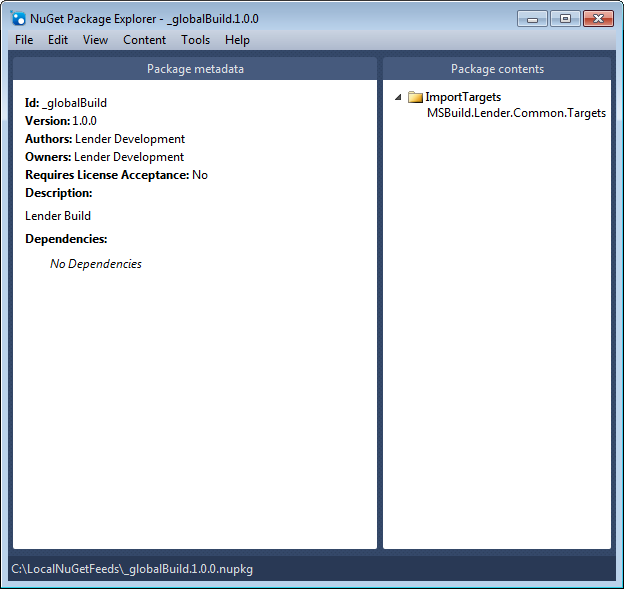
3. Using the NuGet Package Explorer, I opened the Lender.Build.nuspec file and saved the package in the LocalNuGetFeed folder. Here’s how that looks:
4. Save the package to the local NuGet feeds folder. In this case, it is the C:\LocalNuGetFeeds folder.
5. Now let’s move on over to where this “_globalBuild” dependency is going to be used. For example, the C:\projects\Lender.Slos folder. In that folder, create a packages.config file and add it to version control. That config file looks like this:
<?xml version="1.0" encoding="utf-8"?>
<packages>
  <package id="_globalBuild" version="1.0.0" />
</packages>
This references the package with the id of “_globalBuild”, which is found in the LocalNuGetFeeds package. It is one of the available package sources because it was added through Visual Studio, under Tools >> Library Package Manager >> Package Manager Settings.

6. From MSBuild, the CI server calls the “Kickstart” target before running the default script target. The Kickstart target uses the NuGet.exe command line to install the global build package. Here is the MSBuild script:
<Project DefaultTargets="Default"
         xmlns="http://schemas.microsoft.com/developer/msbuild/2003"
         ToolsVersion="4.0"
         >
  <PropertyGroup>
    <RootPath>.</RootPath>
    <BuildPath>$(RootPath)\_globalBuild.1.0.0\ImportTargets</BuildPath>
    <CommonImportFile>$(BuildPath)\MSBuild.Lender.Common.Targets</CommonImportFile>
  </PropertyGroup>

  <Import Condition="Exists('$(CommonImportFile)')"
          Project="$(CommonImportFile)"
          />

  <Target Name="Kickstart" >
    <PropertyGroup>
      <PackagesConfigFile>packages.config</PackagesConfigFile>
      <ReferencesPath>.</ReferencesPath>
    </PropertyGroup>
    <Exec Command="$(NuGetRoot)\nuget.exe i $(PackagesConfigFile) -o $(ReferencesPath)" />
  </Target>

  <!-- The Rebuild or other targets belong here -->
  <Target Name="Default" >
    <PropertyGroup>
      <ProjectFullName Condition="$(ProjectFullName)==''">(undefined)</ProjectFullName>
    </PropertyGroup>

    <Message Text="Project name: '$(ProjectFullName)'"
             Importance="High"
             />
  </Target>

</Project>
7. In this way, the MSBuild script uses NuGet to bring down the ImportTargets files and places them under the _globalBuild.1.0.0 folder. This can happen on the CI server with multiple build steps. For the sake of simplicity here are the lines in a batch file that simulates these steps:
%MSBuildRoot%\msbuild.exe "runner.msbuild" /t:Kickstart
%MSBuildRoot%\msbuild.exe "runner.msbuild"
With the kickstart bringing down the prerequisite files, the rest of the build script performs the automated build using the common Targets properly imported.
For those who would like an overview of Pro .NET Best Practices, here’s a rundown on the book.
The book presents each topic by keeping in mind two objectives: to provide reasonable breath and to go into depth on key practices. For example, the chapter on code analysis looks at both static and dynamic analysis, and it goes into depth with FxCop and StyleCop. The goal is to strike the balance between covering all the topics, discussing the widely-used tools and technologies, and having a reasonable chapter length.
Chapters 1 through 5 are focused on the context of new and different practices. Since adopting better practices is an initiative, it is important to know what practices to prioritize and where to uncover better practices within your organization and current circumstances.
This chapter shows how to choose new and different practices that are better practices for you, your team, and your organization.
This chapter draws out ways to uncover better practices in the areas of .NET and general software development that provide an opportunity to discover or learn and apply better practices.
This chapter presents practical advice on how to get team members to collaborate with each other and work toward a common purpose.
This chapter describes specific practices to help with quantifying the value of adopting better development practices.
This chapter provides you with practices to help you focus on strategy and the strategic implications of current practices.
Chapters 6 through 9 are focused on a developer’s individual practices. These chapters discuss guidelines and conventions to follow, effective approaches, and tips and tricks that are worth knowing. The overarching theme is that each developer helps the whole team succeed by being a more effective developer.
This chapter helps sort out the generalized statements, principles, practices, and procedures that best serve as .NET rules and regulations that support effective and innovative development.
This chapter is an informal review of the C# language’s power both to harness its own strengths and to recognize that effective development is a key part of following .NET practices.
This chapter describes many specific practices to improve test code, consistent with the principles behind effective development and automated testing.
This chapter discusses using build automation to remove error-prone steps, to establish repeatability and consistency, and to improve the build and deployment processes.
Chapters 10 through 12 are focused on supporting tools, products, and technologies. These chapters describe the purpose of various tool sets and present some recommendations on applications and products worth evaluating.
This chapter presents the continuous integration lifecycle with a description of the steps involved within each of the processes. Through effective continuous integration practices, the project can save time, improve team effectiveness, and provide early detection of problems.
This chapter provides an overview of many static and dynamic tools, technologies, and approaches with an emphasis on improvements that provide continuous, automated monitoring.
Chapter 12 is a comprehensive list of testing frameworks and tools with a blend of commercial and open-source alternatives.
The final chapter is about the aversions and biases that keep many individuals, teams, and organizations from adopting better practices. You may face someone’s reluctance to accept or acknowledge a new or different practice as potentially better. You may struggle against another’s tendency to hold a particular view of a new or different practice that undercuts and weakens its potential. Many people resist change even if it is for the better. This chapter helps you understand how aversions and biases impact change so that you can identify them, cope with them, and hopefully manage them.
I am a Microsoft .NET software developer. That explains why the book is about .NET best practices. That’s in my wheelhouse.
The more relevant question is, why a book about best practices?
When it comes right down to it, many best practices are the application of common sense approaches. However, there is something that blocks us from making the relatively simple changes in work habits that produce significant, positive results. I wanted to further explore that quandary. Unfortunately, common sense is not always common practice.
There is a gap between the reality that projects live with and the vision that the team members have for their processes and practices. They envision new and different practices that would likely yield better outcomes for their project. Yet, the project reality is slow to move or simply never moves toward the vision.

Tension between reality and vision
Many developers are discouraged by the simple fact that far too many projects compromise the vision instead of changing the reality. These two concepts are usually in tension. That tension is a source of great frustration and cynicism. I wanted to let people know that their project reality is not an immovable object, and the team members can be an irresistible force.
Part of moving your reality toward your vision is getting a handle on the barriers and objections and working to overcome them. Some of them are external to the team while others are internal to the team. I wanted to relate organizational behavior to following .NET best practices and to software development.
The team must know what to do. They need to know about the systematic approaches that help the individual and the team achieve the desired results. There are key practice areas that yield many benefits:
Of course, there is a lot of overlap in these areas. The management scientist might call that synergy. A common theme to these practice areas is the principle of automation. By acquiring knowledge in these practice areas you find ways to:
Know-how in these practice areas also raises awareness and understanding, creates an early warning system, and provides various stakeholders with a new level of visibility into the project’s progress. I wanted the reader to appreciate the significance and inter-relatedness of these key practice areas and the benefits each offers.
The team needs to know how to do it. Every new and different practice has a learning curve. Climbing that curve takes time and practice. The journey from newbie to expert has to be nurtured. There are no shortcuts that can sidestep the crawl-walk-run progression. Becoming skilled requires experience. Prototyping and building an archetype are two great ways to develop a skill. Code samples and structured walkthroughs are other ways to develop a skill. I wanted the book to offer an eclectic assortment of case studies, walkthroughs, and code samples.
Team members must want to adopt better practices. Managers need to know why the changes are for the better, in terms managers can appreciate. The bottom line, it is important to be able to quantify the benefits of following new and different practices. It is also important to understand what motivates and what doesn’t. It helps to understand human biases. Appreciate the underlying principle that software projects are materially impacted by how well individuals interact. I wanted to highlight and communicate the best practices that relate to the human factors that include persuasion, motivation, and commitment.
Here are the links to Pro .NET Best Practices:
Apress: http://www.apress.com/9781430240235
Amazon: http://www.amazon.com/NET-Best-Practices-Stephen-Ritchie/dp/1430240237
Barnes and Noble: http://www.barnesandnoble.com/w/pro-net-best-practices-stephen-d-ritchie/1104143991

Update 2012-06-04: It still amazes me that not a thing has changed to make it any easier to download FxCopSetup.exe version 10 in the nearly two years since I first read this Channel 9 forum post: http://channel9.msdn.com/Forums/Coffeehouse/561743-How-I-downloaded-and-installed-FxCop As you read the Channel 9 forum entry you can sense the confusion and frustration. However, to this day the Microsoft Download Center still gives you the same old “readme.txt” file instead of the FxCopSetup.exe that you’re looking for.
Below I describe the only Microsoft “official way” (no, you’re not allowed to distribute it yourself) — that I know of — to pull out the FxCopSetup.exe so you can install it on a build server, distribute within your team, or to do some other reasonable thing. It is interesting to note the contrast: the latest StyleCop installer is one mouse click on this CodePlex page: http://stylecop.codeplex.com/
Update 2012-01-13: Alex Netkachov provides short-n-sweet instructions on how to install FxCop 10.0 on this blog post http://www.alexatnet.com/content/how-install-fxcop-10-0
Quick, flash mob! Let’s go liberate the FxCop 10.0 setup program from the Microsoft Windows SDK for Windows 7 and .NET Framework 4 version 7.1 setup.
Have you ever tried to download FxCop 10.0 setup program? Here are the steps to follow, but a few things won’t seem right:
1. [Don’t do this step!] Go to Microsoft’s Download Center page for FxCop 10.0 (download page) and perform the download. The file that is downloaded is actually a readme.txt file.
2. The FxCop 10.0 read-me file has two steps of instruction:
FxCop Installation Instructions
1. Download the Microsoft Windows SDK for Windows 7 and .NET Framework 4 version 7.1.
2. Run %ProgramFiles%\Microsoft SDKs\Windows\v7.1\Bin\FXCop\FxCopSetup.exe to install FxCop.
3. On the actual FxCop 10.0 Download Center page, under the Instructions heading, there are slightly more elaborate instructions:
• Download the Microsoft Windows SDK for Windows 7 and .NET Framework 4 Version 7.1 [with a link to the download]
• Using elevated privileges execute FxCopSetup.exe from the %ProgramFiles%\Microsoft SDKs\Windows\v7.1\Bin\FXCop folder
NOTE:
On the FxCop 10.0 Download Center page, under the Brief Description heading, shouldn’t the text simply describe the steps and provide the link to the Microsoft Windows SDK for Windows 7 and .NET Framework 4 version 7.1 download page? That would be more straightforward.
4. Use the Microsoft Windows SDK for Windows 7 and .NET Framework 4 version 7.1 link to jump over to the SDK download page.
5. [Don’t actually download this, either!] The estimated time to download on a T1 is 49 min. The download file is winsdk_web.exe is 498 KB, but under the Instruction heading the explanation is provided: The Windows SDK is available thru a web setup (this page) that enables you to selectively download and install individual SDK components or via an ISO image file so that you can burn your own DVD. Follow the link over to download the ISO image file.
6. Download the ISO image file on the ISO download page. This is a 570 MB download, which is about 49 min on a T1.
7. Unblock the file and use 7-Zip to extract the ISO files.
8. Navigate to the C:\Downloads\Microsoft\SDK\Setup\WinSDKNetFxTools folder.
9. Open the cab1.cab file within the WinSDKNetFxTools folder. Right-click and select Open in new window from the menu.
10. Switch over to the details file view, sort by name descending , and find the file that’s name starts with WinSDK_FxCopSetup.exe … ” plus some gobbledygook (mine was named “WinSDK_FxCopSetup.exe_all_enu_1B2F0812_3E8B_426F_95DE_4655AE4DA6C6”.)
11. Make a sensibly named folder for the FxCop setup file to go into, for example, create a folder called C:\Downloads\Microsoft\FxCop\Setup.
12. Right-click on the “WinSDK_FxCopSetup.exe + gobbledygook” file and select Copy. Copy the “WinSDK_FxCopSetup.exe + gobbledygook” file into C:\Downloads\Microsoft\FxCop\Setup folder.
13. Rename the file to “FxCopSetup.exe”. This is the FxCop setup file.
14. So the CM, Dev and QA teams or anyone on the project that needs FxCop doesn’t have to perform all of these steps copy the 14 MB FxCopSetup.exe file to a network share.
That’s it. Done.
Apparently, a decision was made to keep the FxCop setup off Microsoft’s Download Center. Now the FxCop 10 setup is deeply buried within the Microsoft Windows SDK for Windows 7 and .NET Framework 4 Version 7.1. Since the FxCop setup was easily available as a separate download it doesn’t make sense to bury it now.
Microsoft’s FxCop 10.0 Download Page really should offer a simple and straightforward way to download the FxCopSetup.exe file. This is way too complicated and takes a lot more time than is appropriate to the task.
P.S.: Much thanks to Matthew1471’s ASP BlogX post that supplied the Rosetta stone needed to get this working.
On a recent project there was one single line of code that a developer added intended to fix a reported issue. It was checked in with a nice, clear comment. It was an innocuous change. If you saw the change yourself then you’d probably say it seemed like a reasonable and well-considered change. It certainly wasn’t a careless change, made in haste. But it was a ticking time bomb; it was a devilish lurking bug (DLB).
Before we started our code-quality initiative the DLB nightmare would have gone something like this:
With our continuous integration (CI) and automated testing in place, here is what actually happened:
Mr. DLB involved a method calling itself recursively, a death-spiral, a very pernicious bug. Within just that one line of added code a seed was planted that sent the system into a stack overflow that then caused the service-host to crash.
Just think about it, having our CI server in place and running automated tests is of immense value to the project:
CI and automated testing are always running and vigilantly. They’re working to ensure that the system deployed to the system-test environment actually works the way the developers intend it to work.
If there’s a difference between the way the system works and the way the developer wants it to work then the team’s going to burn and waste a lot of time, energy and goodwill coping with a totally unintended and unavoidable conflict. If you want problem prevention then you have to focus on early detection.
Code-centric development using an object-relational mapping (ORM) tool has a workflow that many developers find comfortable. They feel productive using the ORM in this way, as opposed to starting with the database model. There are a number of good posts out there on the Entity Framework 4.1 code-first capabilities: MSDN, MSDN Magazine, Scott Guthrie, Channel 9, and Scott Hanselman’s Magic Unicorn Feature. It makes sense to the object-oriented developer and writing code-first comes very naturally.
This prompts the question: When would it be better to take a database-first approach?
For many legacy and Brownfield projects the answer is obvious. You have a database that’s already designed — you may even be stuck with it — therefore you choose database-first approach. This is the defining need for database-first because the database is a fixed point. And so, use database-first when the database design comes from an external requirement or is controlled outside the scope or influence of the project. Similarly, modelling the persistence layer using a model-first approach fits the bill because what you learn about the requirements is expressed in data-centric terms.
Let’s say the project is Greenfield and you have 100% control over the database design. Would a database-first approach ever make sense in that situation?
On-line Transaction Processing (OLTP) and On-line Analytical Processing (OLAP) systems are considered two ends of the the data persistence spectrum. With databases that support OLTP systems the objective is to effectively and properly support the CRUD+Q operations in support of business operations. In the databases that support OLAP systems the objective is to effectively and properly support business intelligence, such as data mining, high-speed data analytics, decision support systems, and other data warehousing goals. These are two extremely different database designs. Many systems’ databases live on a continuum between these two extremes.
I once worked on a student loan originations system. It was a start-with-a-clean-slate, object-oriented development project. Initially, the system was all about entering, reviewing and approving loan applications. We talked about borrowers, students and parents, and their multiple addresses. There was a lot about loan limits and interest rates, check disbursements, and a myriad of complicated and subtle rules and regulations related to creating a loan and making a check disbursement. The system was recording the key records and financial transactions and the database was the master repository of this data. In fulfilling these requirements, the system was a success. However, once the system was readied for parallel Beta-testing at the bank things started to go sideways.
Here is some of what we missed by taking a code-first approach:
What we failed to realize was that the really significant, make-or-break requirements of the system were all reporting or data conversion related. None of it had been seriously brought up or laid out during system development, however, not meeting those requirements took the project very close to the edge of extinction.
A major lesson learned, look very closely at the question of data persistence and retrieval. Work hard to uncover and define the reporting, conversion and other data requirements. Make any hidden or implicit database requirements explicit. Find out if the system is really all about the care and feeding of a relational database.
Adding it all up: if the database-specific requirements significantly overshadow the application-specific requirements then a database-first approach is probably your best bet.
For a long time there has been a widely held belief, early in the collective unconscious and later described in various methodologies: Effective software development requires key elements, like clear deliverable-objectives, a shared understanding of the requirements, realistic estimates of effort, a proper high-level design, and, the most important element of all, effective people.
What happens when the project context doesn’t meet the minimum, essential conditions for a process like Agile development? The project has many missing, ambiguous, or conflicting objectives, and those objectives are nearly always described as activities, not deliverables. There are major differences between what the project leaders, analysts, developers and testers, each think the system is required to do. Every estimate is either prohibitively pessimistic or ultimately turns out to be overly optimistic. The software architecture collapses because it’s not able to carry the system from one sprint to the next, or it’s overly complicated. The project’s people are not sure what to do, how to do it, or aren’t motivated to do it.
In the field of agricultural development, there is the concept of appropriate technology; they say Gandhi fathered this idea. Agricultural development is more successful when straightforward and familiar technologies are used to move from the current status quo to a new, improved status quo. For example, before the tractor would be used effectively farmers should first get comfortable using a team of oxen to plow the fields.
Some ideas to move the team’s status quo from the current state of readiness to the perquisite level:
A catch-phrase for software development; Agile requires agility. Keep an eye on the appropriateness by monitoring the team’s level of agility and positively influence a transition to the next plateau.
There is a lot to know about HTML5 shims, fallbacks and polyfills. Let’s start by trying to define the terms and point to some places on the web to get more information.
The whole idea is to provide a way to develop pages in HTML5 and have everything work properly in a browser that doesn’t natively support HTML5 functionality. For example, this approach can enable the new HTML5 features within IE7.
shim /SHim/
Noun: A relatively small library (js, plugin, etc.) that gets in between the HTML5 and the incompatible browser and patches things — transparently — so the page works properly or as close as practicable. Sometimes referred to as a “shiv”. More info: The Story of the HTML5 Shiv
fallback /ˈfôlˌbak/
Noun: A backup plan when your page detects that it’s being displayed in an incompatible browser. More info: Yet another HTML5 fallback strategy for IE
polyfill /ˈpälē fil/
Noun: A patch or shim that is suitable as a fallback for *a whole lot of* missing functionality.
More info: Modernizr and What is a Polyfill? and HTML5 Cross Browser Polyfills
I’m going to roll up my sleeves now and start with this ScottGu post on HTML5 and ASP.NET MVC 3. It looks like it has some good bits on the modernizr.js JavaScript library.
Pro .NET Best Practices
 Ruthlessly Helpful