Top Posts & Pages
Recent Posts
My Book
Pro .NET Best Practices
Stephen Ritchie's offerings of ruthlessly helpful software engineering practices.
When I wrote about automated testing in “Pro .NET Best Practices,” the challenge was convincing teams to write tests at all. Today, the landscape has shifted dramatically. AI coding assistants can generate tests faster than most developers can write them manually. But this raises a critical question: if AI writes our code and AI writes our tests, who’s actually ensuring quality?
This isn’t a theoretical concern. I’m working with teams right now who are struggling with this exact problem. They’ve adopted AI coding assistants, seen impressive productivity gains, and then discovered that their AI-generated tests pass perfectly while their production systems fail in unexpected ways.
The challenge isn’t whether to use AI for testing; that ship has sailed. The challenge is adapting our testing strategies to maintain quality assurance when both code and tests might come from machine learning models.

Let’s be clear about what’s changed and what hasn’t. The fundamental purpose of automated testing remains the same: gain confidence that code works as intended, catch regressions early, and document expected behavior. What’s changed is the economics and psychology of test creation.
AI coding assistants excel at several testing tasks:
Boilerplate Test Generation: Creating basic unit tests for simple methods, constructors, and data validation logic. These tests are often tedious to write manually, and AI can generate them consistently and quickly.
Test Data Creation: Generating realistic test data, edge cases, and boundary conditions. AI can often identify scenarios that developers might overlook.
Test Coverage Completion: Analyzing code and identifying untested paths or branches. AI can suggest tests that bring coverage percentages up systematically.
Repetitive Test Patterns: Creating similar tests for related functionality, like testing multiple API endpoints with similar structure.
For these scenarios, AI assistance is genuinely ruthlessly helpful. It’s practical (works with existing test frameworks), generally accepted (becoming standard practice), valuable (saves significant time), and archetypal (provides clear patterns).
But there are critical areas where AI-assisted testing introduces new risks:
Assumption Alignment: AI generates tests based on code structure, not business requirements. The tests might perfectly validate the code’s implementation while missing the fact that the implementation itself is wrong.
Test Quality Decay: When tests are easy to generate, teams stop thinking critically about test design. You end up with hundreds of tests that all validate the same happy path while missing critical failure modes.
False Confidence: High test coverage numbers from AI-generated tests can create illusion of safety. Teams see 90% coverage and assume quality, when those tests might be superficial.
Maintenance Burden: AI can create tests faster than you can maintain them. Teams accumulate thousands of tests without considering long-term maintenance cost.
This is where we need new strategies. The old testing approaches from my book still apply, but they need adaptation for AI-assisted development.
Here’s the framework I’m recommending to teams adopting AI coding assistants. It’s based on the principle that different types of tests serve different purposes, and AI is better at some than others.
Let AI generate basic unit tests, but with constraints:
What to Generate:
Quality Gates:
Implementation Example:
// AI excels at generating tests like this
[Theory]
[InlineData(0, 0)]
[InlineData(100, 100)]
[InlineData(-50, 50)]
public void Test_CalculateAbsoluteValue_ReturnsCorrectResult(int input, int expected)
{
    # Arrange + Act
    var result = MathUtilities.CalculateAbsoluteValue(input);

    # Assert
    Assert.Equal(expected, result);
}
The AI can generate these quickly and comprehensively. Your job is ensuring they test the right things.
This is where human judgment becomes critical. Integration tests verify that components work together correctly, and AI often struggles to understand these relationships.
What Humans Should Design: – Tests that verify business rules and workflows – Tests that validate interactions between components – Tests that ensure data flows correctly through the system – Tests that verify security and authorization boundaries
Why Humans, Not AI: AI generates tests based on code structure. Humans design tests based on business requirements and failure modes they’ve experienced. Integration tests require understanding of what the system should do, not just what it does do.
Implementation Approach: 1. Write integration test outlines describing the scenario and expected outcome 2. Use AI to help fill in test setup and data creation 3. Keep assertion logic explicit and human-reviewed 4. Document the business rule or requirement each test validates
This layer compensates for both human and AI blind spots.
Property-Based Testing: Instead of testing specific inputs, test properties that should always be true. AI can help generate the properties, but humans must define what properties matter. For more info, see: Property-based testing in C#
Example:
// Property: Serializing then deserializing should return equivalent object
[Test]
public void Test_SerializationRoundTrip_PreservesData()
{
    # Arrange
    var user = TestHelper.GenerateTestUser();
    var serialized = JsonSerializer.Serialize(user);

    # Act
    var deserialized = JsonSerializer.Deserialize<User>(serialized);

    # Assert
    Assert.Equal(user, deserialized);
}
Exploratory Testing: Use AI to generate random test scenarios and edge cases that humans might not consider. Tools like fuzzing can be enhanced with AI to generate more realistic test inputs.
The ultimate test of quality is production behavior. Modern testing strategies must include:
Synthetic Monitoring: Automated tests running against production systems to validate real-world behavior
Canary Deployments: Gradual rollout with automated rollback on quality metrics degradation
Feature Flags with Metrics: A/B testing new functionality with automated quality gates
Error Budget Tracking: Quantifying acceptable failure rates and automatically alerting when exceeded
This layer catches what all other layers miss. It’s particularly critical when AI is generating code, because AI might create perfectly valid code that behaves unexpectedly under production load or data.
Here’s how to adapt your testing practices for AI-assisted development, starting immediately.
Before generating more tests, understand what you have:
Coverage Analysis:
Test Quality Assessment:
Create clear guidelines for AI-assisted test creation:
When to Use AI:
When to Write Manually:
Quality Standards:
Don’t try to implement all layers at once. Start where you’ll get the most value:
Week 1-2: Implement Layer 1 (AI-generated unit tests)
Week 3-4: Strengthen Layer 2 (Human-designed integration tests)
Week 5-6: Add Layer 4 (Production monitoring)
Later: Add Layer 3 (Property-based testing)
Track both leading and lagging indicators of test effectiveness:
Leading Indicators:
Lagging Indicators:
The goal isn’t maximum test coverage; it’s maximum confidence in quality control at minimum cost.
This is actually a feature, not a bug. Consistent test structure makes tests easier to maintain. The problem is when all tests validate the same thing.
Solution: Focus review effort on test assertions. Do the tests validate different behaviors, or just different inputs to the same behavior? Use code review to catch redundant tests before they accumulate.
AI makes it easy to generate tests, which can lead to exponential growth in test count and execution time.
Solution: Implement test categorization and selective execution. Use tags to distinguish:
Don’t let AI generate slow tests. If a test needs database access or external services, it should be human-designed and tagged appropriately.
This is the fundamental risk of AI-assisted development. Tests validate what the code does, not what it should do.
Solution: Implement Layer 4 (production monitoring) as early as possible. No amount of testing replaces real-world validation. Use production metrics to identify gaps in test coverage and generate new test scenarios.
When tests are auto-generated, they feel less important than production code. Reviews become rubber stamps.
Solution: Make test quality a team value. Track metrics like:
Publicly recognize good test reviews and test design. Make it clear that test quality matters as much as code quality.
Organizations implementing modern testing strategies with AI assistance report numbers that should be taken with a grain of salt, because of source bias, different levels of maturity, and the fact that not all “test coverage” is equally valuable.
Calculate your team’s current testing economics:
Then try to quantify the impact of:
This Week:
This Month:
This Week:
This Month:
This Quarter:
This Year:
When I wrote about automated testing in 2011, the biggest challenge was convincing developers to write tests at all. The objections were always about time: “We don’t have time to write tests, we need to ship features.” I spent considerable effort building the business case for testing; showing how tests save time by catching bugs early.
Today’s challenge is almost the inverse. AI makes test creation so easy that teams can generate thousands of tests without thinking carefully about what they’re testing. The bottleneck has shifted from test creation to test design and maintenance.
This is actually a much better problem to have. Instead of debating whether to test, we’re debating how to test effectively. The ruthlessly helpful framework applies perfectly: automated testing is clearly valuable, widely accepted, and provides clear examples. The question is how to be practical about it.
My recommendation is to embrace AI for what it does well (generating routine, repetitive tests) while keeping humans focused on what we do well:
The teams that thrive won’t be those that generate the most tests or achieve the highest coverage percentages. They’ll be the teams that achieve the highest confidence with the most maintainable test suites. That requires strategic thinking about testing, not just tactical application of AI tools.
One prediction I’m comfortable making: in five years, we’ll look back at current test coverage metrics with the same skepticism we now have for lines-of-code metrics. The question won’t be “how many tests do you have?” but “how confident are you that your system works correctly?” AI-assisted testing can help us answer that question, but only if we’re thoughtful about implementation.
The future of testing isn’t AI vs. humans. It’s AI and humans working together, each doing what they do best, to build more reliable software faster.
For every method-under-test there is a set of valid preconditions and arguments. It is the domain of all possible values that allows the method to work properly. That domain defines the method’s boundaries. Boundary testing requires analysis to determine the valid preconditions and the valid arguments. Once these are established, you can develop tests to verify that the method guards against invalid preconditions and arguments.
Boundary-value analysis is about finding the limits of acceptable values, which includes looking at the following:
An example of a situational case for dates is a deadline or time window. You could imagine that for a student loan origination system, a loan disbursement must occur no earlier than 30 days before or no later than 60 days after the first day of the semester.
Another situational case might be a restriction on age, dollar amount, or interest rate. There are also rounding-behavior limits, like two-digits for dollar amounts and six-digits for interest rates. There are also physical limits to things like weight and height and age. Both zero and one behave uniquely in certain mathematical expressions. Time zone, language and culture, and other test conditions could be relevant. Analyzing all these limits helps to identify boundaries used in test code.
Note: Dealing with date arithmetic can be tricky. Boundary analysis and good test code makes sure that the date and time logic is correct.
When the test code calls a method-under-test with an invalid argument, the method should throw an argument exception. This is the intended behavior, but to verify it requires a negative test. A negative test is test code that passes if the method-under-test responds negatively; in this case, throwing an argument exception.
The test code shown here fails the test because ComputePayment is provided an invalid termInMonths of zero. This is test code that’s not expecting an exception.
[TestCase(7499, 1.79, 0, 72.16)]
public void ComputePayment_WithProvidedLoanData_ExpectProperMonthlyPayment(
  decimal principal,
  decimal annualPercentageRate,
  int termInMonths,
  decimal expectedPaymentPerPeriod)
{
  // Arrange
  var loan =
    new Loan
    {
      Principal = principal,
      AnnualPercentageRate = annualPercentageRate,
    };

  // Act
  var actual = loan.ComputePayment(termInMonths);

  // Assert
  Assert.AreEqual(expectedPaymentPerPeriod, actual);
}
The result of the failing test is shown, it’s output from Unexpected Exception.
LoanTests.ComputePayment_WithProvidedLoanData_ExpectInvalidArgumentException : Failed
System.ArgumentOutOfRangeException : Specified argument was out of the range of valid
values.

Parameter name: termInPeriods
at
Tests.Unit.Lender.Slos.Model.LoanTests.ComputePayment_WithProvidedLoanData_ExpectInvalidArgu
mentException(Decimal principal, Decimal annualPercentageRate, Int32 termInMonths, Decimal
expectedPaymentPerPeriod) in LoanTests.cs: line 25
The challenge is to pass the test when the exception is thrown. Also, the test code should verify that the exception type is InvalidArgumentException. This requires the method to somehow catch the exception, evaluate it, and determine if the exception is expected.
In NUnit this can be accomplished using either an attribute or a test delegate. In the case of a test delegate, the test method can use a lambda expression to define the action step to perform. The lambda is assigned to a TestDelegate variable within the Act section. In the Assert section, an assertion statement verifies that the proper exception is thrown when the test delegate is invoked.
The invalid values for the termInMonths argument are found by inspecting the ComputePayment method’s code, reviewing the requirements, and performing boundary analysis. The following invalid values are discovered:
Below the new test is written to verify that the ComputePayment method throws an ArgumentOutOfRangeException whenever an invalid term is passed as an argument to the method. These are negative tests, with expected exceptions.
[TestCase(7499, 1.79, 0, 72.16)]
[TestCase(7499, 1.79, -1, 72.16)]
[TestCase(7499, 1.79, -2, 72.16)]
[TestCase(7499, 1.79, int.MinValue, 72.16)]
[TestCase(7499, 1.79, 361, 72.16)]
[TestCase(7499, 1.79, int.MaxValue, 72.16)]
public void ComputePayment_WithInvalidTermInMonths_ExpectArgumentOutOfRangeException(
  decimal principal,
  decimal annualPercentageRate,
  int termInMonths,
  decimal expectedPaymentPerPeriod)
{
  // Arrange
  var loan =
    new Loan
    {
      Principal = principal,
      AnnualPercentageRate = annualPercentageRate,
    };

  // Act
  TestDelegate act = () => loan.ComputePayment(termInMonths);

  // Assert
  Assert.Throws<ArgumentOutOfRangeException>(act);
}
Every object is in some arranged state at the time a method of that object is invoked. The state may be valid or it may be invalid. Whether explicit or implicit, all methods have expected preconditions. Since the method’s preconditions are not spelled out, one goal of good test code is to test those assumptions as a way of revealing the implicit expectations and turning them into explicit preconditions.
For example, before calculating a payment amount, let’s say the principal must be at least $1,000 and less than $185,000. Without knowing the code, these limits are hidden preconditions of the ComputePayment method. Test code can make them explicit by arranging the classUnderTest with unacceptable values and calling the ComputePayment method. The test code asserts that an expected exception is thrown when the method’s preconditions are violated. If the exception is not thrown, the test fails.
This code sample is testing invalid preconditions.
[TestCase(0, 1.79, 360, 72.16)]
[TestCase(997, 1.79, 360, 72.16)]
[TestCase(999.99, 1.79, 360, 72.16)]
[TestCase(185000, 1.79, 360, 72.16)]
[TestCase(185021, 1.79, 360, 72.16)]
public void ComputePayment_WithInvalidPrincipal_ExpectInvalidOperationException(
  decimal principal,
  decimal annualPercentageRate,
  int termInMonths,
  decimal expectedPaymentPerPeriod)
{
  // Arrange
  var classUnderTest =
  new Application(null, null, null)
  {
    Principal = principal,
    AnnualPercentageRate = annualPercentageRate,
  };

  // Act
  TestDelegate act = () => classUnderTest.ComputePayment(termInMonths);

  // Assert
  Assert.Throws<InvalidOperationException>(act);
}
Implicit preconditions should be tested and defined by a combination of exploratory testing and inspection of the code-under-test, whenever possible. Test the boundaries by arranging the class-under-test in improbable scenarios, such as negative principal amounts or interest rates.
Tip: Testing preconditions and invalid arguments prompts a lot of questions. What is the principal limit? Is it $18,500 or $185,000? Does it change from year to year?
More on boundary-value analysis can be found at Wikipedia https://en.wikipedia.org/wiki/Boundary-value_analysis
In November I traveled to Upstate New York to present at four .NET Users Group. Here’s the overview:
I realize it is belated, but I’d like to extend a very big and heartfelt thank you to the organizers of these users groups for putting together a great series of meetings.
Thank you to Stephanie Carino from Apress for connecting me with the organizers. I really appreciate all the help with all the public relations, the swag, the promotion codes, the raffle copies of my book, and for the tweets and re-tweets.
My presentations are available on SlideShare under my RuthlessHelp account, but if you are looking for something specific then here are the four presentations:
All the code samples can be found on GitHub under my RuthlessHelp account: https://github.com/ruthlesshelp/Presentations
If you attended one of these presentations, please rate me at SpeakerRate:
You can also rate me at INETA: http://ineta.org/Speakers/SearchCommunitySpeakers.aspx?SpeakerId=b7b92f6b-ac28-413f-9baf-9764ff95be79

Yesterday I traveled up to Long Island, New York to present at the LI .NET Users Group. A very big thank you to the LI.NET organizers for putting together a great September meeting. I especially enjoyed the New York pizza. The group last night was great. Very good turnout. The audience had many good questions and comments. Also, there were a lot of follow up discussions after the meeting.
Thank you to Stephanie Carino from Apress for connecting me with the organizers of LI.NET. I really appreciate all the help with all the public relations, the swag, the promotion codes, the raffle copies of my book, and for the live tweets and pictures.
I especially want to thank Mike Shaw for coordinating with me and recording the presentation. He was very helpful and kept me informed every step of the way. I will link to the presentation once it is posted.
Here are the code samples, available through GitHub.
https://github.com/ruthlesshelp/Presentations
Here are the slides, available through SlideShare.
 Although I have been developing software for more than 20 years, on Saturday I went to my first Code Camp. I delivered one session at Philly.NET Code Camp on the topic of Automated Unit and Integration Testing with Databases.
I was amazed. Philly.NET Code Camp is like a mini TechEd. I am impressed at how professionally everything was done. Registration, content, food, facilities, etc. This group knows how to put on a code camp. It is a testament to the capability and dedication of Philly.NET; it’s leadership and members. Keep up the good work. Thank you for an awesome day. I cannot wait for the next one.
Here are the slides, available through SlideShare.
The sample code from my session (Tools track, 1:40 PM) is available here:
Also, please review the requirements for using the code samples in the section below the slides.
To use the sample code, you need to create the Lender.Slos database. The following are the expectations and requirements needed to create the database.
The sample code assumes you have Microsoft SQL Server Express 2008 R2 installed on your development machine. The server name used throughout is (local)\SQLExpress. Although the sample code will probably work on other/earlier versions of SQL Server, that has not been verified. Also, if you use another server instance then you will need to change the server name in all the connection strings.
Under the 0_Database folder there are database scripts, which are used to create the database schema. For the sake of simplicity there are a few command files that use MSBuild to run the database scripts, automate the build, and automate running the tests. These batch files assume you defined the following environment variables:
The DbCreate.SqlExpress.Lender.Slos.bat command file creates the database on the (local)\SQLExpress server.
With the database created and the environment variables set, run the Lender.Slos.CreateScripts.bat command file to execute all the SQL create scripts in the correct order. If you prefer to run the scripts manually then you will find them in the $_Database\Scripts\Create folder. The script_run_order.txt file lists the proper order to run the scripts. If all the scripts run properly there will be three tables (Individual, Student and Application) and twelve stored procedures (a set of four CRUD stored procedures for each of the tables) in the database.
The sample code from the May 1, 2012 presentation of Automated Unit and Integration Testing with NDbUnit to the CMAP Main Meeting is available on GitHub: https://github.com/ruthlesshelp/Presentations. Please review the requirements for using the code samples in the section below the slides.
The slides are available on SlideShare.
To use the sample code, you need to create the Lender.Slos database. The following are the expectations and requirements needed to create the database.
The sample code assumes you have Microsoft SQL Server Express 2008 R2 installed on your development machine. The server name used throughout is (local)\SQLExpress. Although the sample code will probably work on other/earlier versions of SQL Server, that has not been verified. Also, if you use another server instance then you will need to change the server name in all the connection strings.
The sample code for this presentation is within the NDbUnit folder.
Under the 0_Database folder there are database scripts, which are used to create the database schema. For the sake of simplicity there are a few command files that use MSBuild to run the database scripts, automate the build, and automate running the tests. These batch files assume you defined the following environment variables:
The DbCreate.SqlExpress.Lender.Slos.bat command file creates the database on the (local)\SQLExpress server.
With the database created and the environment variables set, run the Lender.Slos.CreateScripts.bat command file to execute all the SQL create scripts in the correct order. If you prefer to run the scripts manually then you will find them in the $_Database\Scripts\Create folder. The script_run_order.txt file lists the proper order to run the scripts. If all the scripts run properly there will be three tables (Individual, Student and Application) and twelve stored procedures (a set of four CRUD stored procedures for each of the tables) in the database.
Often I am asked variations on this question: Should I unit test private methods?
The Visual Studio Team Test blog describes the Publicize testing technique in Visual Studio as one way to unit test private methods. There are other methods.
As a rule of thumb: Do not unit test private methods.
The concept of encapsulation means that a class’s internal state and behavior should remain “unpublished”. Any instance of that class is only manipulated through the exposed properties and methods.
The class “publishes” properties and methods by using the C# keywords: public, protected, and internal.
The one keyword that says “keep out” is private. Only the class itself needs to know about this property or method. Since any unit test ensures that the code works as intended, the idea of some outside code testing a private method is unconventional. A private method is not intended to be externally visible, even to test code.
However, the question goes deeper than unconventional. Is it unwise to unit test private methods?
Yes. It is unwise to unit test private methods.
When you refactor the code-under-test, and the private methods are significantly changed, then the test code testing private methods must be refactored. This inhibits the refactoring of the class-under-test.
It should be straightforward to refactor a class when no public properties or methods are impacted. Private properties and methods, because they are not intended to be directly called, should be allowed to freely and easily change. A lot of test code that directly calls private members causes headaches.
Avoid testing the internal semantics of a class. It is the published semantics that you want to test.
Some dead code is only kept alive by the test methods that call it.
If only the public interface is tested, private methods are only called thorough public-method test coverage. Any private method or branch within the private method that cannot be reached through test coverage is dead code. Private method testing short-circuits this analysis.
Yes, these are my views on what might be a hot topic to some. There are other arguments, pro and con, many of which are covered in this article: http://www.codeproject.com/Articles/9715/How-to-Test-Private-and-Protected-methods-in-NET

Unless you want your automated tests to send a text message to one of your users, you ought to use a fake phone number. In the U.S., there is the “dummy” 555 phone exchange, often used for fictional phone numbers in the movies and television.
These fake phone numbers are very helpful. For example, use these fake numbers to test the data entry validation of telephone numbers through the user interface.
What about automated tests that verify email address validation? Try using firstname.lastname@example.com.
In all the testing that you do, select fake Internet data:
Fake URLs: http://www.example.com/default.aspx
Fake top-level domain (TLD) names: .test, .example, .invalid
Fake second-level domain names: example.com, example.org, example.net, example.edu
Fake host names: http://www.example.com, http://www.example.org, http://www.example.net, http://www.example.edu
Source: http://en.wikipedia.org/wiki/Example.com
Source: http://en.wikipedia.org/wiki/Top-level_domain#Reserved_domains
In the U.S., a Social Security number (SSN) is a nine-digit number issued to an individual by the Social Security Administration. Since the SSN is unique for every individual, it is personally identifiable information (PII), which warrants special handling. As a best practice, you do not want PII in your test data, scripts, or code.
There are special Social Security numbers which will never be allocated:
For many, changing all the SSNs to use the 987-00-xxxx works great, where xxxx is the original last four digits of the SSN. If duplicate SSNs are an issue then use the 666 prefix or 000 prefix (or use sequential numbers for the center digit group) as a way to resolve duplicates.
Source: http://en.wikipedia.org/wiki/Social_security_number#Valid_SSNs
There are tons of sources of fake data out on the Internet. Here is one such place to start your search:
http://www.quicktestingtips.com/tips/category/test-data/
The is the fourth and final part in the Four Ways to Fake Time series. In Part 3 you learned how to use the IClock interface to improve testability. Using the IClock interface is very effective for new application development. However, when maintaining a legacy system adding a new parameter to a class constructor might be a strict no-no.
This part looks at how a mock isolation framework can help. The goal of isolation testing is to test the code-under-test in a way that is separate from dependencies and any underlying components or subsystems. This post looks at how to fake time using the product TypeMock Isolator.
The primary benefit of a mock isolation framework is that no refactoring of the code-under-test is needed. In other words, you can test legacy code as it is, without having to improve its testability before writing maintainable test code. Here is the code-under-test:
using System;
using Lender.Slos.Utilities.Configuration;

namespace Lender.Slos.Financial
{
    public class ModificationWindow
    {
        private readonly IModificationWindowSettings _settings;

        public ModificationWindow(
            IModificationWindowSettings settings)
        {
            _settings = settings;
        }

        public bool Allowed()
        {
            var now = DateTime.Now;

            // Start date's month & day come from settings
            var startDate = new DateTime(
                now.Year,
                _settings.StartMonth,
                _settings.StartDay);

            // End date is 1 month after the start date
            var endDate = startDate.AddMonths(1);

            if (now >= startDate &&
                now < endDate)
            {
                return true;
            }

            return false;
        }
    }
}
With TypeMock, the magic happens in two ways. First, the test method arrangement uses the Isolate class to setup expectations. The test method sets up the DateTime.Now property so that it returns currentTime as its value. This fakes the Allowed method.
Here is the revised test code:
[TestCase(1)]
[TestCase(5)]
[TestCase(12)]
[Isolated] // This is a TypeMock attribute
public void Allowed_WhenCurrentDateIsInsideModificationWindow_ExpectTrue(
    int startMonth)
{
    // Arrange
    var settings = new Mock<IModificationWindowSettings>();
    settings
        .SetupGet(e => e.StartMonth)
        .Returns(startMonth);
    settings
        .SetupGet(e => e.StartDay)
        .Returns(1);

    var classUnderTest =
        new ModificationWindow(settings.Object);

    var currentTime = new DateTime(
        DateTime.Now.Year,
        startMonth,
        13);

    Isolate
        .WhenCalled(() => DateTime.Now)
        .WillReturn(currentTime); // Setup getter to return the test's clock

    // Act
    var result = classUnderTest.Allowed();

    // Assert
    Assert.AreEqual(true, result);
}
Second, the test must run in an isolated environment. This is how TypeMock fakes the behavior of System.DateTime; the test is running within the TypeMock environment. Here is the TypeMock Isolator configuration window.
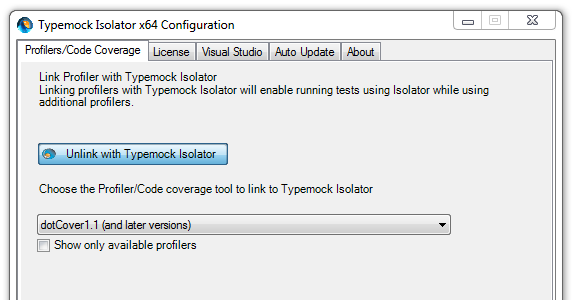
Since TypeMock Isolator is a commercial product, be prepared to make the case for purchasing Typemock. Here is some information on the business case for TypeMock: http://www.typemock.com/typemock-newsletters/2011/3/7/typemock-newsletter-march-2011.html
I find that TypeMock Isolator 6.2.3.0 is well integrated with Visual Studio 2010 SP1, ReSharper 6.1 and dotCover 1.2.
In Chapter 2 of Pro .NET Best Practices, you learn about Microsoft Research and the Pex and Moles project. Moles is a Visual Studio power tool, and you will find the latest download through the Visual Studio Gallery. As I describe, the Moles framework allows Pex to test code in isolation so that Pex is able to automatically generate tests. Therefore, you can use Moles to write unit tests that fake time.
Moles, as a way to fake time, is described in the Channel 9 post Moles – Replace any .NET method with a delegate and the blog post Did you know Microsoft makes a mocking tool?.
Just like Code Contracts, I hope and expect that Microsoft will make Moles a more significant part of .NET and Visual Studio. Today, I don’t find that Moles offers the same level of integration (for now?) with ReSharper and dotCover that TypeMock has. When I use Moles, I run my test code within their isolation environment from the command line. It works, but I really do prefer using the ReSharper test runner.
To sum up the mock isolation framework approach:
Pros:
Cons:
I hope you found this overview of four ways to fake time to be helpful. I certainly would appreciate hearing from you about any new, different, and hopefully better ways to fake time in coded testing.
In Part 2 of this four part series you learned how to use a class property to change the code’s dependency on the system clock to make the code easier to test. Adding the Now property is effective, however, adding a new property to every class isn’t always the best solution.
I don’t remember exactly when I first encountered the IClock interface. I do remember having to deal with the testability challenges of the system clock about 5 years ago. I was developing a scheduling module and needed to write tests that verified the code’s correctness. I think I learned about the IClock interface when I researched the MbUnit testing framework. At some point I read about IDateTime in Ben Hall’s blog or this article in ASP Alliance. I also read about FreezeClock in Ben’s post on xUnit.net extensions. Over time I collected the ideas and background that underlie this and similar approaches.
I usually create a straightforward IClock interface within some utility or common assembly of the system. It becomes a low-level primitive of the system. In this post, I simplify the IClock interface just to keep the focus on the primary concept. Below I provide links to more detailed and elaborate designs. Without further ado, here is the basic IClock interface:
using System;

namespace Lender.Slos.Utilities.Clock
{
    public interface IClock
    {
        DateTime Now { get; }
    }
}
By using the IClock interface, the code in our example class is modified so that it has a dependency on the system clock through a new constructor parameter. Here is the rewritten code-under-test:
using System;
using Lender.Slos.Utilities.Clock;
using Lender.Slos.Utilities.Configuration;

namespace Lender.Slos.Financial
{
    public class ModificationWindow
    {
        private readonly IClock _clock;
        private readonly IModificationWindowSettings _settings;

        public ModificationWindow(
            IClock clock,
            IModificationWindowSettings settings)
        {
            _clock = clock;
            _settings = settings;
        }

        public bool Allowed()
        {
            var now = _clock.Now;

            // Start date's month & day come from settings
            var startDate = new DateTime(
                now.Year,
                _settings.StartMonth,
                _settings.StartDay);

            // End date is 1 month after the start date
            var endDate = startDate.AddMonths(1);

            if (now >= startDate &&
                now < endDate)
            {
                return true;
            }

            return false;
        }
    }
}
Under non-test circumstances, the SystemClock class, which implements the IClock interface, is passed through the constructor. A very simple SystemClock class looks like this:
using System;

namespace Lender.Slos.Utilities.Clock
{
    public class SystemClock : IClock
    {
        public DateTime Now
        {
            get { return DateTime.Now; }
        }
    }
}
For those of you who are using an IoC container, it should be clear how the appropriate implementation is injected into the constructor when this class is instantiated. I recommend you use constructor DI when using the IClock interface approach. For those following a Factory pattern, the factory class ought to supply a SystemClock instance when the factory method is called. If you’re not loosely coupling your dependencies (you ought to be) then you need to add another constructor that instantiates a new SystemClock, kind of like this:
public ModificationWindow(IModificationWindowSettings settings)
    : this(new SystemClock(), settings)
{
}
In this post, we are most concerned about improving the testability of the code-under-test. The revised test method sets up the IClock.Now property so as to return currentTime as its value. This, in effect, fakes the Allowed method, and establishes a known value for the system clock. Here is the revised test code:
[TestCase(1)]
[TestCase(5)]
[TestCase(12)]
public void Allowed_WhenCurrentDateIsInsideModificationWindow_ExpectTrue(
    int startMonth)
{
    // Arrange
    var settings = new Mock<IModificationWindowSettings>();
    settings
        .SetupGet(e => e.StartMonth)
        .Returns(startMonth);
    settings
        .SetupGet(e => e.StartDay)
        .Returns(1);

    var currentTime = new DateTime(
        DateTime.Now.Year,
        startMonth,
        13);

    var clock = new Mock<IClock>();
    clock
        .SetupGet(e => e.Now)
        .Returns(currentTime); // Setup getter to return the test's clock

    var classUnderTest =
        new ModificationWindow(
            clock.Object,
            settings.Object);

    // Act
    var result = classUnderTest.Allowed();

    // Assert
    Assert.AreEqual(true, result);
}
If you’re looking for more depth and detail, take a look at this very good post on the IClock interface by Al Gonzalez: http://algonzalez.tumblr.com/post/679028234/iclock-a-test-friendly-alternative-to-datetime
The Gallio/MbUnit testing framework has its own IClock interface. I don’t like production deployments containing testing framework assemblies; however, the Gallio approach offers a few ideas to enhance the IClock interface.
Pros:
Cons:
I often use this approach when working in Greenfield application development or when major refactoring is warranted.
In the next part of this Fake Time series we’ll look at a mock isolation framework approach.
Pro .NET Best Practices
 Ruthlessly Helpful