Top Posts & Pages
Recent Posts
My Book
Pro .NET Best Practices
Stephen Ritchie's offerings of ruthlessly helpful software engineering practices.
John McBride recently wrote “Gas Town is a glimpse into the future”, and that article got me thinking about where we actually are on the road to AI-assisted software engineering. Not where enthusiasts claim we are. Not where skeptics fear we are. Where we actually are.
Gas Town is Steve Yegge’s experimental framework for agentic AI development. Instead of Sprints, Product Owners, and Scrum Masters, you’ve got towns, Mayors, rigs, crew members, hooks, and polecats. There’s only one human role: “a god-like entity called the Observer (you) who hands the mayor mandates.” The system runs continuous agent sessions, it’s highly experimental, and—at the moment—only works for people who can afford dozens of Claude Max accounts at $200/month each.
It’s also described as addictive.
I’m not recommending you install Gas Town. I’m not installing it myself. But watching what explorers like Yegge are doing tells us something important about where this technology actually is; and how long it might take before the rest of us can use it productively.

The Oregon Trail to Agentic AI
I often use a metaphor of change by reflecting on the journey from St. Louis to Oregon:
The journey that once required years of preparation and carried a significant chance of death is now a routine afternoon trip. But it didn’t happen overnight. Each stage required different capabilities, different costs, and different levels of acceptable risk.
From what I can tell, Gas Town is firmly in the Lewis and Clark phase of discovery.
Steve Yegge isn’t building a product. He’s running an expedition. In interviews, he says he’s pushing limits and expects that someone will eventually put this together in a way that people can reason about easily. With that new tooling, process, and practices, there will be new roles, events, and artifacts.
This is exactly what explorers do: they chart unknown territory so that later travelers can understand the terrain.
The terrain Yegge is mapping includes questions like:
These are the questions that must be answered before we can build the Oregon Trail, let alone the railroad.
Let me apply the framework from my book to evaluate where agentic AI development actually stands today:
Verdict: No, not yet—for most teams
Gas Town requires: – Dozens of concurrent AI sessions ($200/month each) – Tolerance for experimental, addictive tooling – Significant expertise to interpret and correct agent behavior – A willingness to be an explorer, not a traveler
This isn’t a criticism. Lewis and Clark’s expedition wasn’t practicable for Oregon farmers either. That was never the point. The expedition’s purpose was discovery, not travel.
For typical development teams, the current state of agentic AI is: – Too expensive for routine use – Too unpredictable for production work – Too complex for teams without dedicated expertise – Too immature for sustainable practices
Verdict: No. It’s an explorer community, not general adoption
There’s no industry data on agentic AI adoption because there’s nothing widespread enough to measure. The community consists of: – AI researchers and enthusiasts pushing boundaries – Well-funded experiments at large technology companies – Individual explorers like Yegge with the resources and appetite for risk
This is normal for the Lewis and Clark phase. The practice isn’t generally accepted because it isn’t general yet.
Verdict: The potential is enormous, but current value is unclear
The promise of agentic AI is compelling: – Dramatically reduced development time for routine work – Ability to tackle larger projects with smaller teams – Automation of tedious maintenance and refactoring tasks
But the current reality is: – High cost-to-benefit ratio for most use cases – Significant time spent supervising and correcting agent behavior – Quality concerns about AI-generated code at scale – Unknown long-term maintenance implications
We don’t yet know whether the value proposition will hold up as the technology matures, or whether the costs will decrease faster than the capabilities improve.
Verdict: Not for production use; it’s only for experimentation
Gas Town itself is an example, but it’s explicitly experimental. Yegge describes it as “addictive” and acknowledges it’s not ready for general use. There are no archetypal patterns yet for: – Integrating agentic AI into typical development workflows – Managing the costs at sustainable levels – Ensuring quality and maintainability of agent-produced code – Training and onboarding teams to work with these systems
Overall Assessment: 0/4 criteria met for production adoption
This doesn’t mean agentic AI won’t eventually meet all four criteria. It means we’re watching an expedition, not a product launch.
An article in Today in Tabs, “All Gas Town, No Brakes Town,” asks exactly the right questions:
“Will the AI ever gain a high level conceptual understanding of how to structure software to be reliable and maintainable, when it isn’t currently capable of a high-level conceptual understanding of how to run a vending machine? Will today’s junior developers ever gain that understanding themselves if they spend their careers instructing the AI rather than writing code? Will there even be junior developers if all the senior devs are handing off that work to polecats or whatever?”
These aren’t questions that explorers need to answer. Lewis and Clark didn’t need to figure out how to run a railroad or schedule commercial airline flights. But these are the questions that matter for the Oregon Trail and beyond.
If junior developers spend their early careers instructing AI rather than writing code, will they develop the deep understanding needed to: – Debug complex systems? – Make architectural decisions? – Identify subtle quality problems? – Know when the AI is wrong?
We don’t know the answer. The pioneers who eventually walked the Oregon Trail developed practical skills that railroad passengers never needed—and those skills became obsolete. Perhaps the same will happen with traditional coding skills. Perhaps it won’t.
Current AI systems are impressive at pattern matching and code generation, but they lack the conceptual understanding that experienced developers bring. They can produce code that looks right but isn’t—because they don’t understand what “right” means in context.
Will that change? Maybe. The gap between GPT-3 and GPT-4 was surprisingly large. Future advances might bridge the conceptual gap. Or the gap might prove fundamental.
Right now, agentic AI is expensive. Dozens of sessions at $200/month adds up quickly. For the economics to work broadly, either: – AI compute costs must drop dramatically – AI productivity gains must exceed the high costs – New architectures must emerge that are more efficient
All three are plausible. None is guaranteed.
The history of the Oregon Trail suggests some patterns:
Before there’s a railroad, there will be trails. Expect: – Frameworks and tools that make agentic AI more accessible – Best practices emerging from early adopters – Significant failures and hard lessons – Gradually decreasing costs and increasing capabilities – Enterprise experiments with mixed results
This phase will be characterized by high effort, high risk, and high reward for those who get it right. Most organizations should observe carefully but not invest heavily.
Eventually, the paths will be well-worn enough to build reliable infrastructure. Expect: – Platform products that abstract away complexity – Standardized practices for human-AI collaboration – Predictable cost and quality models – Mainstream adoption by large enterprises – Significant workforce transformation
This is when most organizations should adopt—when the practices become practicable, generally accepted, valuable, and archetypal.
At some point, the journey becomes routine. Expect: – AI-assisted development as a standard capability – Developers who never knew a world without AI agents – New challenges we can’t currently anticipate – Integration so deep it’s invisible
But remember: the people flying Southwest today don’t need to know anything about Lewis and Clark. The knowledge and practices evolved until the complexity was hidden.
If you’re a development leader, the question isn’t “should we adopt agentic AI?” The question is: “What phase of the journey are we prepared for?”
Commentary: When I wrote “Pro .NET Best Practices” in 2011, I didn’t dare imagine the AI developments we’re seeing today. But the framework I developed (practicable, generally accepted, valuable, and archetypal) applies directly to evaluating emerging technologies. The question is never “is this exciting?” It’s always “is this right for our team, right now?” For most teams, agentic AI isn’t right yet. That’s not a criticism of the technology. It’s a recognition of where we are on the trail.
Even if you’re not ready to join the expedition, the explorers are generating valuable knowledge:
Gas Town is genuinely fascinating. Steve Yegge and explorers like him are doing important work that will eventually benefit all of us. They’re finding the paths, documenting the obstacles, and demonstrating what’s possible.
But the Oregon Trail killed a lot of pioneers. The people who prospered were the ones who waited for the railroad (or fly Southwest).
For most development teams, the ruthlessly helpful approach to agentic AI is:
The journey from St. Louis to Oregon is now a $170 flight. Someday, AI-assisted software development will be that routine. But we’re not there yet.
We’re watching Lewis and Clark from a distance, taking notes, and preparing for the world they’re discovering.
There is a shift toward agent‑assisted and agent‑orchestrated coding. I’m not on the frontier, but I believe I can see it up ahead. I believe it works. And it seems to be accelerating.
The biggest increase is an individual engineer’s ability to leverage the tooling. They need to know how to:
Teams need to train on …
AI creates huge productivity gains based on number of agents used, orchestration skill, and an ability to handle “massively multi-agent” workflows.
Frontier developer tooling is now very focused on:
The idea is that a single developer can operate like a high-efficiency factory, not a traditional dev team.
If you’re trying to keep up, you’ll see a lot of mention of Beads, Ralph, Gas Town, Loom, and Claude-Flow.
.beads/ directory in the Git repository.”It’s very hard to keep up, but I try to keep up by reading Steve Yegge’s blog.
I read this blog post last night. And I read it again this morning. Oof! It’s hard to keep up.
https://steve-yegge.medium.com/steveys-birthday-blog-34f437139cb5
When I wrote about automated testing in “Pro .NET Best Practices,” the challenge was convincing teams to write tests at all. Today, the landscape has shifted dramatically. AI coding assistants can generate tests faster than most developers can write them manually. But this raises a critical question: if AI writes our code and AI writes our tests, who’s actually ensuring quality?
This isn’t a theoretical concern. I’m working with teams right now who are struggling with this exact problem. They’ve adopted AI coding assistants, seen impressive productivity gains, and then discovered that their AI-generated tests pass perfectly while their production systems fail in unexpected ways.
The challenge isn’t whether to use AI for testing; that ship has sailed. The challenge is adapting our testing strategies to maintain quality assurance when both code and tests might come from machine learning models.
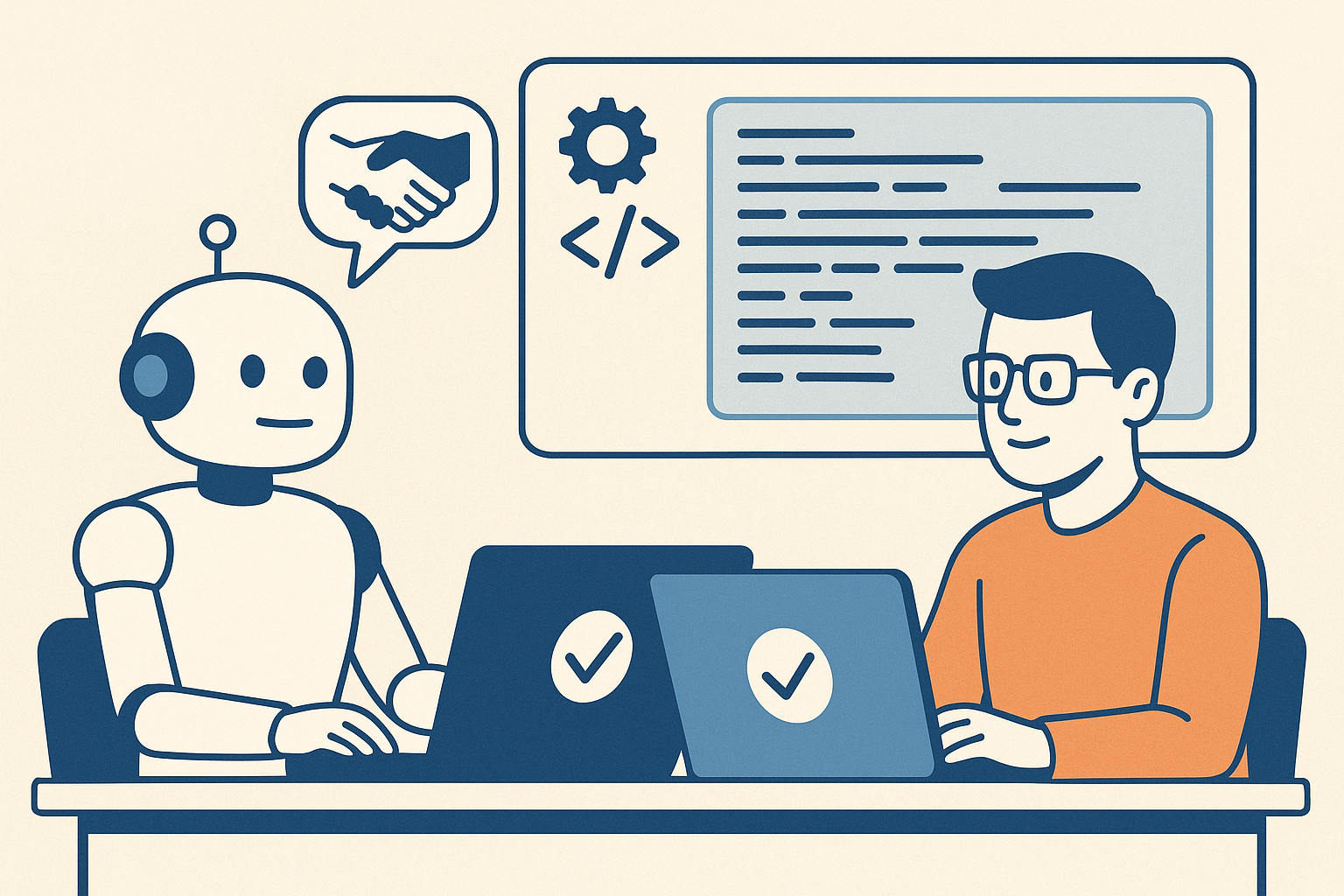
Let’s be clear about what’s changed and what hasn’t. The fundamental purpose of automated testing remains the same: gain confidence that code works as intended, catch regressions early, and document expected behavior. What’s changed is the economics and psychology of test creation.
AI coding assistants excel at several testing tasks:
Boilerplate Test Generation: Creating basic unit tests for simple methods, constructors, and data validation logic. These tests are often tedious to write manually, and AI can generate them consistently and quickly.
Test Data Creation: Generating realistic test data, edge cases, and boundary conditions. AI can often identify scenarios that developers might overlook.
Test Coverage Completion: Analyzing code and identifying untested paths or branches. AI can suggest tests that bring coverage percentages up systematically.
Repetitive Test Patterns: Creating similar tests for related functionality, like testing multiple API endpoints with similar structure.
For these scenarios, AI assistance is genuinely ruthlessly helpful. It’s practical (works with existing test frameworks), generally accepted (becoming standard practice), valuable (saves significant time), and archetypal (provides clear patterns).
But there are critical areas where AI-assisted testing introduces new risks:
Assumption Alignment: AI generates tests based on code structure, not business requirements. The tests might perfectly validate the code’s implementation while missing the fact that the implementation itself is wrong.
Test Quality Decay: When tests are easy to generate, teams stop thinking critically about test design. You end up with hundreds of tests that all validate the same happy path while missing critical failure modes.
False Confidence: High test coverage numbers from AI-generated tests can create illusion of safety. Teams see 90% coverage and assume quality, when those tests might be superficial.
Maintenance Burden: AI can create tests faster than you can maintain them. Teams accumulate thousands of tests without considering long-term maintenance cost.
This is where we need new strategies. The old testing approaches from my book still apply, but they need adaptation for AI-assisted development.
Here’s the framework I’m recommending to teams adopting AI coding assistants. It’s based on the principle that different types of tests serve different purposes, and AI is better at some than others.
Let AI generate basic unit tests, but with constraints:
What to Generate:
Quality Gates:
Implementation Example:
// AI excels at generating tests like this
[Theory]
[InlineData(0, 0)]
[InlineData(100, 100)]
[InlineData(-50, 50)]
public void Test_CalculateAbsoluteValue_ReturnsCorrectResult(int input, int expected)
{
    # Arrange + Act
    var result = MathUtilities.CalculateAbsoluteValue(input);

    # Assert
    Assert.Equal(expected, result);
}
The AI can generate these quickly and comprehensively. Your job is ensuring they test the right things.
This is where human judgment becomes critical. Integration tests verify that components work together correctly, and AI often struggles to understand these relationships.
What Humans Should Design: – Tests that verify business rules and workflows – Tests that validate interactions between components – Tests that ensure data flows correctly through the system – Tests that verify security and authorization boundaries
Why Humans, Not AI: AI generates tests based on code structure. Humans design tests based on business requirements and failure modes they’ve experienced. Integration tests require understanding of what the system should do, not just what it does do.
Implementation Approach: 1. Write integration test outlines describing the scenario and expected outcome 2. Use AI to help fill in test setup and data creation 3. Keep assertion logic explicit and human-reviewed 4. Document the business rule or requirement each test validates
This layer compensates for both human and AI blind spots.
Property-Based Testing: Instead of testing specific inputs, test properties that should always be true. AI can help generate the properties, but humans must define what properties matter. For more info, see: Property-based testing in C#
Example:
// Property: Serializing then deserializing should return equivalent object
[Test]
public void Test_SerializationRoundTrip_PreservesData()
{
    # Arrange
    var user = TestHelper.GenerateTestUser();
    var serialized = JsonSerializer.Serialize(user);

    # Act
    var deserialized = JsonSerializer.Deserialize<User>(serialized);

    # Assert
    Assert.Equal(user, deserialized);
}
Exploratory Testing: Use AI to generate random test scenarios and edge cases that humans might not consider. Tools like fuzzing can be enhanced with AI to generate more realistic test inputs.
The ultimate test of quality is production behavior. Modern testing strategies must include:
Synthetic Monitoring: Automated tests running against production systems to validate real-world behavior
Canary Deployments: Gradual rollout with automated rollback on quality metrics degradation
Feature Flags with Metrics: A/B testing new functionality with automated quality gates
Error Budget Tracking: Quantifying acceptable failure rates and automatically alerting when exceeded
This layer catches what all other layers miss. It’s particularly critical when AI is generating code, because AI might create perfectly valid code that behaves unexpectedly under production load or data.
Here’s how to adapt your testing practices for AI-assisted development, starting immediately.
Before generating more tests, understand what you have:
Coverage Analysis:
Test Quality Assessment:
Create clear guidelines for AI-assisted test creation:
When to Use AI:
When to Write Manually:
Quality Standards:
Don’t try to implement all layers at once. Start where you’ll get the most value:
Week 1-2: Implement Layer 1 (AI-generated unit tests)
Week 3-4: Strengthen Layer 2 (Human-designed integration tests)
Week 5-6: Add Layer 4 (Production monitoring)
Later: Add Layer 3 (Property-based testing)
Track both leading and lagging indicators of test effectiveness:
Leading Indicators:
Lagging Indicators:
The goal isn’t maximum test coverage; it’s maximum confidence in quality control at minimum cost.
This is actually a feature, not a bug. Consistent test structure makes tests easier to maintain. The problem is when all tests validate the same thing.
Solution: Focus review effort on test assertions. Do the tests validate different behaviors, or just different inputs to the same behavior? Use code review to catch redundant tests before they accumulate.
AI makes it easy to generate tests, which can lead to exponential growth in test count and execution time.
Solution: Implement test categorization and selective execution. Use tags to distinguish:
Don’t let AI generate slow tests. If a test needs database access or external services, it should be human-designed and tagged appropriately.
This is the fundamental risk of AI-assisted development. Tests validate what the code does, not what it should do.
Solution: Implement Layer 4 (production monitoring) as early as possible. No amount of testing replaces real-world validation. Use production metrics to identify gaps in test coverage and generate new test scenarios.
When tests are auto-generated, they feel less important than production code. Reviews become rubber stamps.
Solution: Make test quality a team value. Track metrics like:
Publicly recognize good test reviews and test design. Make it clear that test quality matters as much as code quality.
Organizations implementing modern testing strategies with AI assistance report numbers that should be taken with a grain of salt, because of source bias, different levels of maturity, and the fact that not all “test coverage” is equally valuable.
Calculate your team’s current testing economics:
Then try to quantify the impact of:
This Week:
This Month:
This Week:
This Month:
This Quarter:
This Year:
When I wrote about automated testing in 2011, the biggest challenge was convincing developers to write tests at all. The objections were always about time: “We don’t have time to write tests, we need to ship features.” I spent considerable effort building the business case for testing; showing how tests save time by catching bugs early.
Today’s challenge is almost the inverse. AI makes test creation so easy that teams can generate thousands of tests without thinking carefully about what they’re testing. The bottleneck has shifted from test creation to test design and maintenance.
This is actually a much better problem to have. Instead of debating whether to test, we’re debating how to test effectively. The ruthlessly helpful framework applies perfectly: automated testing is clearly valuable, widely accepted, and provides clear examples. The question is how to be practical about it.
My recommendation is to embrace AI for what it does well (generating routine, repetitive tests) while keeping humans focused on what we do well:
The teams that thrive won’t be those that generate the most tests or achieve the highest coverage percentages. They’ll be the teams that achieve the highest confidence with the most maintainable test suites. That requires strategic thinking about testing, not just tactical application of AI tools.
One prediction I’m comfortable making: in five years, we’ll look back at current test coverage metrics with the same skepticism we now have for lines-of-code metrics. The question won’t be “how many tests do you have?” but “how confident are you that your system works correctly?” AI-assisted testing can help us answer that question, but only if we’re thoughtful about implementation.
The future of testing isn’t AI vs. humans. It’s AI and humans working together, each doing what they do best, to build more reliable software faster.
When I titled my book Pro .NET Best Practices back in 2011, I wrestled with that word “best.” It’s a superlative that suggests there’s nothing better, no room for discussion, and no consideration of context. Over the years, I’ve watched teams struggle not because they lacked good practices, but because they blindly adopted “best practices” that weren’t right for their situation.
Today, as development teams face an overwhelming array of tools, frameworks, and methodologies, this challenge has only intensified. The industry produces new “best practices” faster than teams can evaluate them, let alone implement them effectively. It’s time we moved beyond the cult of “best” and embraced something more practical: being ruthlessly helpful.
The software development industry loves superlatives. We have “best practices,” “cutting-edge frameworks,” and “industry-leading tools.” But here’s what I’ve learned from working with hundreds of development teams: the practice that transforms one team might completely derail another.
Consider continuous deployment—often touted as a “best practice” for modern development teams. For a team with mature automated testing, strong monitoring, and a culture of shared responsibility, continuous deployment can be transformative. But for a team still struggling with manual testing processes and unclear deployment procedures, jumping straight to continuous deployment is like trying to run before learning to walk.
The problem isn’t with the practice itself. The problem is treating any practice as universally “best” without considering context, readiness, and specific team needs.
Instead of asking “What are the best practices?” we should ask “What practices would be ruthlessly helpful for our team right now?” This shift in thinking changes everything about how we evaluate and adopt new approaches.
A ruthlessly helpful practice must meet four criteria:
The practice must be something your team can actually implement given your current constraints, skills, and organizational context. This isn’t about lowering standards—it’s about being honest about what’s achievable.
A startup with three developers has different constraints than an enterprise team with fifty. A team transitioning from waterfall to agile has different needs than one that’s been practicing DevOps for years. The most elegant practice in the world is useless if your team can’t realistically adopt it.
While innovation has its place, most teams benefit from practices that have been proven in real-world environments. Generally accepted practices come with community support, documentation, tools, and examples of both success and failure.
This doesn’t mean chasing every trend. It means choosing practices that have demonstrated value across multiple organizations and contexts, with enough adoption that you can find resources, training, and peer support.
A ruthlessly helpful practice must address actual problems your team faces, not theoretical issues or problems you think you might have someday. The value should be measurable and connected to outcomes that matter to your stakeholders.
If your team’s biggest challenge is deployment reliability, adopting a new code review tool might be a good practice, but it’s not ruthlessly helpful right now. Focus on practices that move the needle on your most pressing challenges.
The practice should come with concrete examples and implementation patterns that your team can follow. Abstract principles are useful for understanding, but teams need specific guidance to implement practices successfully.
Look for practices that include not just the “what” and “why,” but the “how”—with code examples, tool configurations, and step-by-step implementation guidance.
Let’s apply this framework to a practice many teams are considering today: AI-assisted development with tools like GitHub Copilot.
Is it Practicable? For most development teams in 2025, yes. The tools are accessible, integrate with existing workflows, and don’t require massive infrastructure changes. However, teams need basic proficiency with their existing development tools and some familiarity with code review practices.
Is it Generally Accepted? Increasingly, yes. Major organizations are adopting AI assistance, there’s growing community knowledge, and the tools are becoming standard in many development environments. We’re past the experimental phase for basic AI assistance.
Is it Valuable? This depends entirely on your context. If your team spends significant time on boilerplate code, routine testing, or documentation, AI assistance can provide measurable value. If your primary challenges are architectural decisions or complex domain logic, the value may be limited.
Is it Archetypal? Yes, with caveats. There are clear patterns for effective AI tool usage, but teams need to develop their own guidelines for code review, quality assurance, and skill development in an AI-assisted environment.
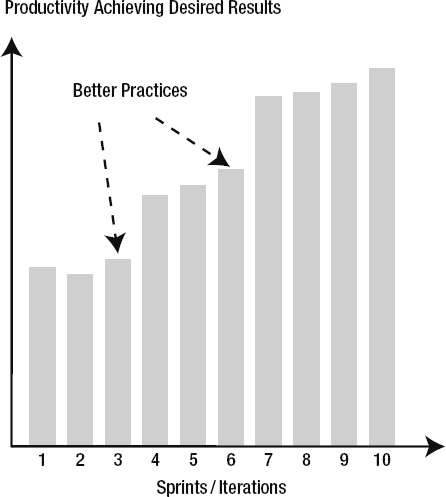
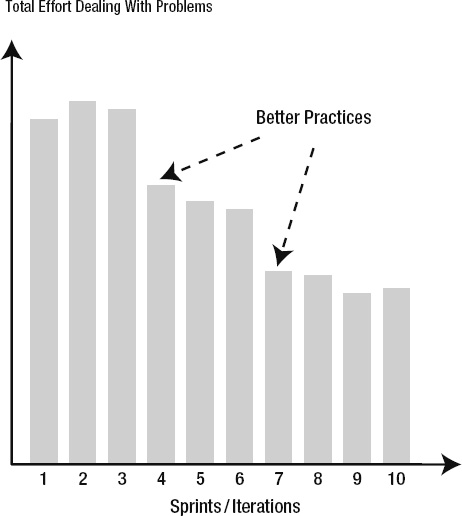
For many teams today, AI-assisted development meets the criteria for a ruthlessly helpful practice. But notice how the evaluation depends on team context, current challenges, and implementation readiness.
Even when a practice meets all four criteria, teams often struggle with adoption. Here are the most common obstacles I’ve observed:
Teams often try to implement practices perfectly from day one. This leads to overwhelm and abandonment when reality doesn’t match expectations.
Solution: Embrace incremental adoption. Start with the simplest, highest-value aspects of a practice and build competency over time. Perfect implementation is the enemy of practical progress.
Many teams choose tools before understanding the practice, leading to solutions that don’t fit their actual needs.
Solution: Understand the practice principles first, then evaluate tools against your specific requirements. The best tool is the one that fits your team’s context and constraints.
Technical practices often require cultural changes that teams underestimate or ignore entirely.
Solution: Address cultural and process changes explicitly. Plan for training, communication, and gradual behavior change alongside technical implementation.
One of the most important aspects of adopting new practices is measuring their impact. Here’s how to approach measurement for ruthlessly helpful practices:
Take inventory of your current development practices using the ruthlessly helpful framework:
Remember, the goal isn’t to adopt the most practices or the most advanced practices. The goal is to adopt practices that make your team more effective at delivering value.
Fourteen years after writing Pro .NET Best Practices, I’m more convinced than ever that context matters more than consensus when it comes to development practices. The “best practice” approach encourages cargo cult programming—teams adopting practices because they worked somewhere else, without understanding why or whether they fit the current situation.
The ruthlessly helpful framework isn’t just about practice selection—it’s about developing judgment. Teams that learn to evaluate practices systematically become better at adapting to change, making strategic decisions, and avoiding the latest hype cycles.
What’s changed since 2011 is the velocity of change in our industry. New frameworks, tools, and practices emerge constantly. The teams that thrive aren’t necessarily those with the best individual practices—they’re the teams that can quickly and accurately evaluate what’s worth adopting and what’s worth ignoring.
The irony is that by being more selective and contextual about practice adoption, teams often end up with better practices overall. They invest their limited time and energy in changes that actually move the needle, rather than spreading themselves thin across the latest trends.
The most successful teams I work with today have learned to be ruthlessly helpful to themselves—choosing practices that fit their context, solve their problems, and provide clear paths to implementation. It’s a more humble approach than chasing “best practices,” but it’s also more effective.
What practices is your team considering? How do they measure against the ruthlessly helpful criteria? Share your thoughts and experiences in the comments below.
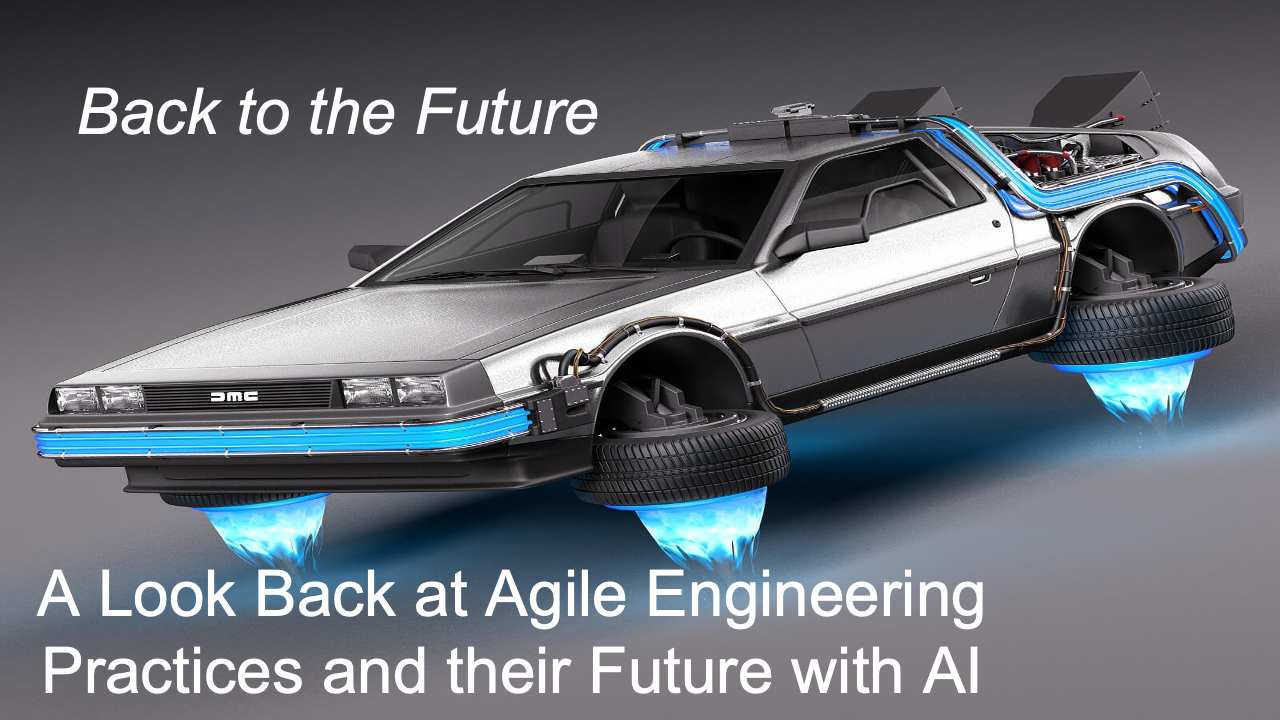
Fadi Stephan and I presented our Back to the Future – A look back at Agile Engineering Practices and their Future with AI talk at AgileDC 2025. I think Back to the Future with AI is bit simpler.
In this blog post I explain what this talk is all about. The theme is to understand how AI is transforming the Agile engineering practices established decades ago.
The talk began by revisiting the origins of Agile in 2001 at Snowbird, Utah, when methodologies like XP, Scrum, and Crystal led to the Agile Manifesto and its 12 principles. We focused on Principle #9 “Continuous attention to technical excellence and good design enhances agility” and asked whether that principle still holds true in 2025.
Note: AI isn’t just changing how code is written … it’s challenging the very reasons Agile engineering practices were created. Yet our goal is not to replace Agile, but to evolve it for the AI era.
We reviewed six practices that we teach and coach teams on as we reflect on the adoption.
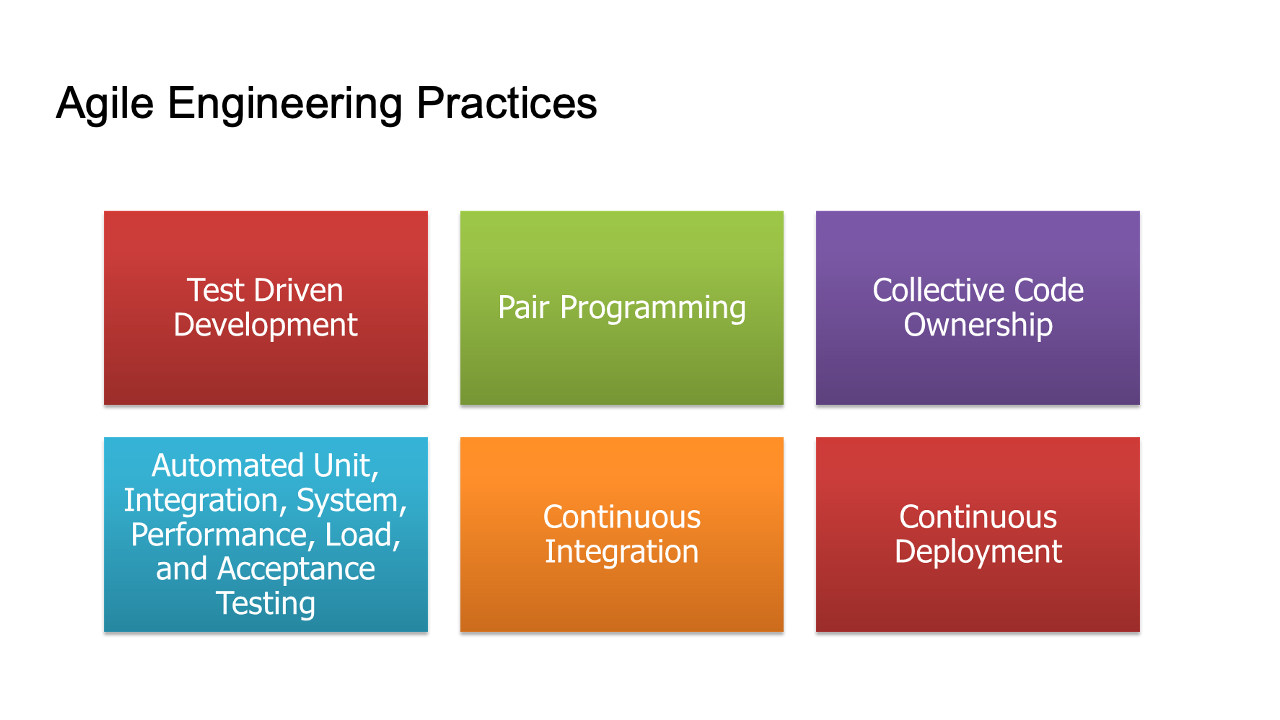
Note: that while CI/CD and test automation have spread widely, it is true TDD, Pair Programming, and Collective Code Ownership that remain rare. Yet these are the very practices that make the others sustainable.
Part 1: Fadi and I performed human-with-human TDD and pair programming using a simple spreadsheet project.
Part 2: I continued the process with AI assistance (GitHub Copilot), showing how AI can take over much of the “red-green-refactor” loop through comment-based prompting.
Next, we looked toward the future and made some informed guesses about where things might go.
| Classic Agile Practice | Evolved AI Practice |
|---|---|
| Test-Driven Development | Prompt-Driven Development |
| Pair Programming | AI Pairing |
| Collective Code Ownership | AI Code Ownership |
| Automated Testing | Acceptance Spec–Driven Development |
| Continuous Integration | AI-Generated Test Suites |
| Continuous Deployment | Infrastructure as Spec |
As AI takes over mechanical and repetitive aspects, the human role shifts to:
We concluded the talk by emphasizing that Agile’s core values of collaboration, learning, and delivering customer value will remain essential. However, the means of achieving technical excellence are evolving rapidly. Rather than resisting change, developers should co-evolve with AI, embracing new forms of collaboration, feedback, and craftsmanship.
The Agile practices of 2001 are not obsolete; but in the age of AI, they are being reborn.
A very big thank you to AgileDC 2025 for hosting our presentation yesterday. Fadi Stephan and I gave a talk titled, “Back to the Future – A look back at Agile Engineering Practices and their Future with AI” offered our experience and perspective on a few important questions:
I want to thank Fadi for co-presenting and for the hard work he put in to our discussing, debating, and deliberating on the topic of Agile Engineering with AI. Our work together continues to shape my thinking on software development. I will have a follow-on blog post that covers our presentation in depth.
If you are interested in learning about AI TDD, or building quality products with AI, or other advanced topics, then I recommend you check out the Kaizenko offerings:
I highly recommend Fadi’s coaching and training. It’s top shelf. It’s practical, hands-on, and it’s the best place to start to elevate your know-how and get to the next level.
Check out all that Fadi does here: https://www.kaizenko.com/
These days I’m doing a lot of Coding with AI, which you can see on my YouTube channel, @stephenritchie4462. You’ll find various playlists of interest. For the Coding with AI playlist, I basically record myself performing an AI-assisted development task. I try ideas out in a variety ways, as a way to explore. If you are an AI skeptic, I recommend experimenting just to see how being an AI Explorer feels. I was surprised by how interesting and useful and fun coding with AI can be.
First, I attended the keynote speech by Zuzana “Zuzi” Šochová on “Organizational Guide to Business Agility”. I enjoyed many of the ideas that Zuzi brought out:
Note that AgileDC is on her Top 10 Agile conferences to attend in 2025.
Then I attended the Sponsor Panel discussion on The State of Agile in the DC Region. A lot of thought provoking discussion with both a somber yet hopeful tone. The DC region is certainly undergoing changes and managing the transition will be hard.
For Session 1, I attended Industrial Driven Development (IDD) by Jim Damato and Pete Oliver-Krueger. For me industrialization is a fascinating topic. It’s about building the machine that builds the machine. In other words, manufacturing a part or product in the physical world requires engineers to build a system of machines that build the part or product. I am amazed at what their consulting work has accomplished with regard to shortening lead times.
Next, I attended Delivering value with Impact by Andrew Long. This was the most thought provoking session of the day. I particularly liked the useful metaphors on connecting Action to Customer to Behavior to Impact. There were several key insight related to using customer behavior change as a leverage point to increase the business impact your receive from your team’s actions.
After a hardy lunch and catching up with Sean George, I attended the Middle guard in Midgard… session by David Fogel. The topic is related to how the Old Guard (fixed mindset) and the New Guard (growth mindset) represent two different camps found in the Agile transformation. Midguard is the present reality. So, as an Agile Coach you’re in the present reality of working with the Middle Guard, who are a mix of both fixed mindset reservations and growth mindset desires. After the topic was introduced, it was facilitated using “Pass the cards” per Jean Tabaka (or the 35 Shuffle technique), which was a masterclass in how to use dot voting efficiently in a workshop. A lot of good knowledge sharing.
Next, I attended AI Pair Programming: Human-Centered Development in the Age of Vibe Coding by George Lively. From my software engineering perspective, what I learned here will provide the most grist for my follow-on learning and experimentation. What George showed us was his excellent experiment and the demonstration of how AI-assisted software development can both accelerate delivery and be well managed. He applied static code analysis, test code coverage, quality metrics, and DORA metrics in a way that shows how AI Pair Programming can work well.
Next was Fadi and I at the 3:15pm session. As I mentioned above, I will blog separately on our session topic.
Finally, I sat in on Richard Cheng‘s From Painful to Powerful: Sprint Planning & Sprint Review That Actually Work session. Richard has an excellent way of explaining the practical application of the Scrum Framework. He takes the concepts and framework and gives clear advice on how to improve the events, such as Sprint Planning and Sprint Review. In this session, he reminded me of some of the pitfalls that trip me up to this day; I need to stop forgetting how to avoid them. The session showcased why Richard is an excellent Certified Scrum Trainer (CST), and his training never disappoints. Check out his offerings: https://www.agilityprimesolutions.com/training
As many of you might know, Richard and I used to co-train (though I was never on an equal footing) when we both worked together at the training org that is now Sprightbulb Learning.
In addition to attending sessions and learning a lot, it was great to catch up with friends and former colleagues who attended the conference. Some I hadn’t seen in years. A big highlight of AgileDC are the connections and reconnections in the DC area’s Agile community.
You’ll find Fadi on LinkedIn here: https://www.linkedin.com/in/fadistephan/
You’ll find my LinkedIn here: https://www.linkedin.com/in/sritchie/
Take care, please stay in touch, and I hope to see you next time!
Pro .NET Best Practices
 Ruthlessly Helpful