Top Posts & Pages
Recent Posts
My Book
Pro .NET Best Practices
Stephen Ritchie's offerings of ruthlessly helpful software engineering practices.
John McBride recently wrote “Gas Town is a glimpse into the future”, and that article got me thinking about where we actually are on the road to AI-assisted software engineering. Not where enthusiasts claim we are. Not where skeptics fear we are. Where we actually are.
Gas Town is Steve Yegge’s experimental framework for agentic AI development. Instead of Sprints, Product Owners, and Scrum Masters, you’ve got towns, Mayors, rigs, crew members, hooks, and polecats. There’s only one human role: “a god-like entity called the Observer (you) who hands the mayor mandates.” The system runs continuous agent sessions, it’s highly experimental, and—at the moment—only works for people who can afford dozens of Claude Max accounts at $200/month each.
It’s also described as addictive.
I’m not recommending you install Gas Town. I’m not installing it myself. But watching what explorers like Yegge are doing tells us something important about where this technology actually is; and how long it might take before the rest of us can use it productively.

The Oregon Trail to Agentic AI
I often use a metaphor of change by reflecting on the journey from St. Louis to Oregon:
The journey that once required years of preparation and carried a significant chance of death is now a routine afternoon trip. But it didn’t happen overnight. Each stage required different capabilities, different costs, and different levels of acceptable risk.
From what I can tell, Gas Town is firmly in the Lewis and Clark phase of discovery.
Steve Yegge isn’t building a product. He’s running an expedition. In interviews, he says he’s pushing limits and expects that someone will eventually put this together in a way that people can reason about easily. With that new tooling, process, and practices, there will be new roles, events, and artifacts.
This is exactly what explorers do: they chart unknown territory so that later travelers can understand the terrain.
The terrain Yegge is mapping includes questions like:
These are the questions that must be answered before we can build the Oregon Trail, let alone the railroad.
Let me apply the framework from my book to evaluate where agentic AI development actually stands today:
Verdict: No, not yet—for most teams
Gas Town requires: – Dozens of concurrent AI sessions ($200/month each) – Tolerance for experimental, addictive tooling – Significant expertise to interpret and correct agent behavior – A willingness to be an explorer, not a traveler
This isn’t a criticism. Lewis and Clark’s expedition wasn’t practicable for Oregon farmers either. That was never the point. The expedition’s purpose was discovery, not travel.
For typical development teams, the current state of agentic AI is: – Too expensive for routine use – Too unpredictable for production work – Too complex for teams without dedicated expertise – Too immature for sustainable practices
Verdict: No. It’s an explorer community, not general adoption
There’s no industry data on agentic AI adoption because there’s nothing widespread enough to measure. The community consists of: – AI researchers and enthusiasts pushing boundaries – Well-funded experiments at large technology companies – Individual explorers like Yegge with the resources and appetite for risk
This is normal for the Lewis and Clark phase. The practice isn’t generally accepted because it isn’t general yet.
Verdict: The potential is enormous, but current value is unclear
The promise of agentic AI is compelling: – Dramatically reduced development time for routine work – Ability to tackle larger projects with smaller teams – Automation of tedious maintenance and refactoring tasks
But the current reality is: – High cost-to-benefit ratio for most use cases – Significant time spent supervising and correcting agent behavior – Quality concerns about AI-generated code at scale – Unknown long-term maintenance implications
We don’t yet know whether the value proposition will hold up as the technology matures, or whether the costs will decrease faster than the capabilities improve.
Verdict: Not for production use; it’s only for experimentation
Gas Town itself is an example, but it’s explicitly experimental. Yegge describes it as “addictive” and acknowledges it’s not ready for general use. There are no archetypal patterns yet for: – Integrating agentic AI into typical development workflows – Managing the costs at sustainable levels – Ensuring quality and maintainability of agent-produced code – Training and onboarding teams to work with these systems
Overall Assessment: 0/4 criteria met for production adoption
This doesn’t mean agentic AI won’t eventually meet all four criteria. It means we’re watching an expedition, not a product launch.
An article in Today in Tabs, “All Gas Town, No Brakes Town,” asks exactly the right questions:
“Will the AI ever gain a high level conceptual understanding of how to structure software to be reliable and maintainable, when it isn’t currently capable of a high-level conceptual understanding of how to run a vending machine? Will today’s junior developers ever gain that understanding themselves if they spend their careers instructing the AI rather than writing code? Will there even be junior developers if all the senior devs are handing off that work to polecats or whatever?”
These aren’t questions that explorers need to answer. Lewis and Clark didn’t need to figure out how to run a railroad or schedule commercial airline flights. But these are the questions that matter for the Oregon Trail and beyond.
If junior developers spend their early careers instructing AI rather than writing code, will they develop the deep understanding needed to: – Debug complex systems? – Make architectural decisions? – Identify subtle quality problems? – Know when the AI is wrong?
We don’t know the answer. The pioneers who eventually walked the Oregon Trail developed practical skills that railroad passengers never needed—and those skills became obsolete. Perhaps the same will happen with traditional coding skills. Perhaps it won’t.
Current AI systems are impressive at pattern matching and code generation, but they lack the conceptual understanding that experienced developers bring. They can produce code that looks right but isn’t—because they don’t understand what “right” means in context.
Will that change? Maybe. The gap between GPT-3 and GPT-4 was surprisingly large. Future advances might bridge the conceptual gap. Or the gap might prove fundamental.
Right now, agentic AI is expensive. Dozens of sessions at $200/month adds up quickly. For the economics to work broadly, either: – AI compute costs must drop dramatically – AI productivity gains must exceed the high costs – New architectures must emerge that are more efficient
All three are plausible. None is guaranteed.
The history of the Oregon Trail suggests some patterns:
Before there’s a railroad, there will be trails. Expect: – Frameworks and tools that make agentic AI more accessible – Best practices emerging from early adopters – Significant failures and hard lessons – Gradually decreasing costs and increasing capabilities – Enterprise experiments with mixed results
This phase will be characterized by high effort, high risk, and high reward for those who get it right. Most organizations should observe carefully but not invest heavily.
Eventually, the paths will be well-worn enough to build reliable infrastructure. Expect: – Platform products that abstract away complexity – Standardized practices for human-AI collaboration – Predictable cost and quality models – Mainstream adoption by large enterprises – Significant workforce transformation
This is when most organizations should adopt—when the practices become practicable, generally accepted, valuable, and archetypal.
At some point, the journey becomes routine. Expect: – AI-assisted development as a standard capability – Developers who never knew a world without AI agents – New challenges we can’t currently anticipate – Integration so deep it’s invisible
But remember: the people flying Southwest today don’t need to know anything about Lewis and Clark. The knowledge and practices evolved until the complexity was hidden.
If you’re a development leader, the question isn’t “should we adopt agentic AI?” The question is: “What phase of the journey are we prepared for?”
Commentary: When I wrote “Pro .NET Best Practices” in 2011, I didn’t dare imagine the AI developments we’re seeing today. But the framework I developed (practicable, generally accepted, valuable, and archetypal) applies directly to evaluating emerging technologies. The question is never “is this exciting?” It’s always “is this right for our team, right now?” For most teams, agentic AI isn’t right yet. That’s not a criticism of the technology. It’s a recognition of where we are on the trail.
Even if you’re not ready to join the expedition, the explorers are generating valuable knowledge:
Gas Town is genuinely fascinating. Steve Yegge and explorers like him are doing important work that will eventually benefit all of us. They’re finding the paths, documenting the obstacles, and demonstrating what’s possible.
But the Oregon Trail killed a lot of pioneers. The people who prospered were the ones who waited for the railroad (or fly Southwest).
For most development teams, the ruthlessly helpful approach to agentic AI is:
The journey from St. Louis to Oregon is now a $170 flight. Someday, AI-assisted software development will be that routine. But we’re not there yet.
We’re watching Lewis and Clark from a distance, taking notes, and preparing for the world they’re discovering.
When I wrote about automated testing in “Pro .NET Best Practices,” the challenge was convincing teams to write tests at all. Today, the landscape has shifted dramatically. AI coding assistants can generate tests faster than most developers can write them manually. But this raises a critical question: if AI writes our code and AI writes our tests, who’s actually ensuring quality?
This isn’t a theoretical concern. I’m working with teams right now who are struggling with this exact problem. They’ve adopted AI coding assistants, seen impressive productivity gains, and then discovered that their AI-generated tests pass perfectly while their production systems fail in unexpected ways.
The challenge isn’t whether to use AI for testing; that ship has sailed. The challenge is adapting our testing strategies to maintain quality assurance when both code and tests might come from machine learning models.
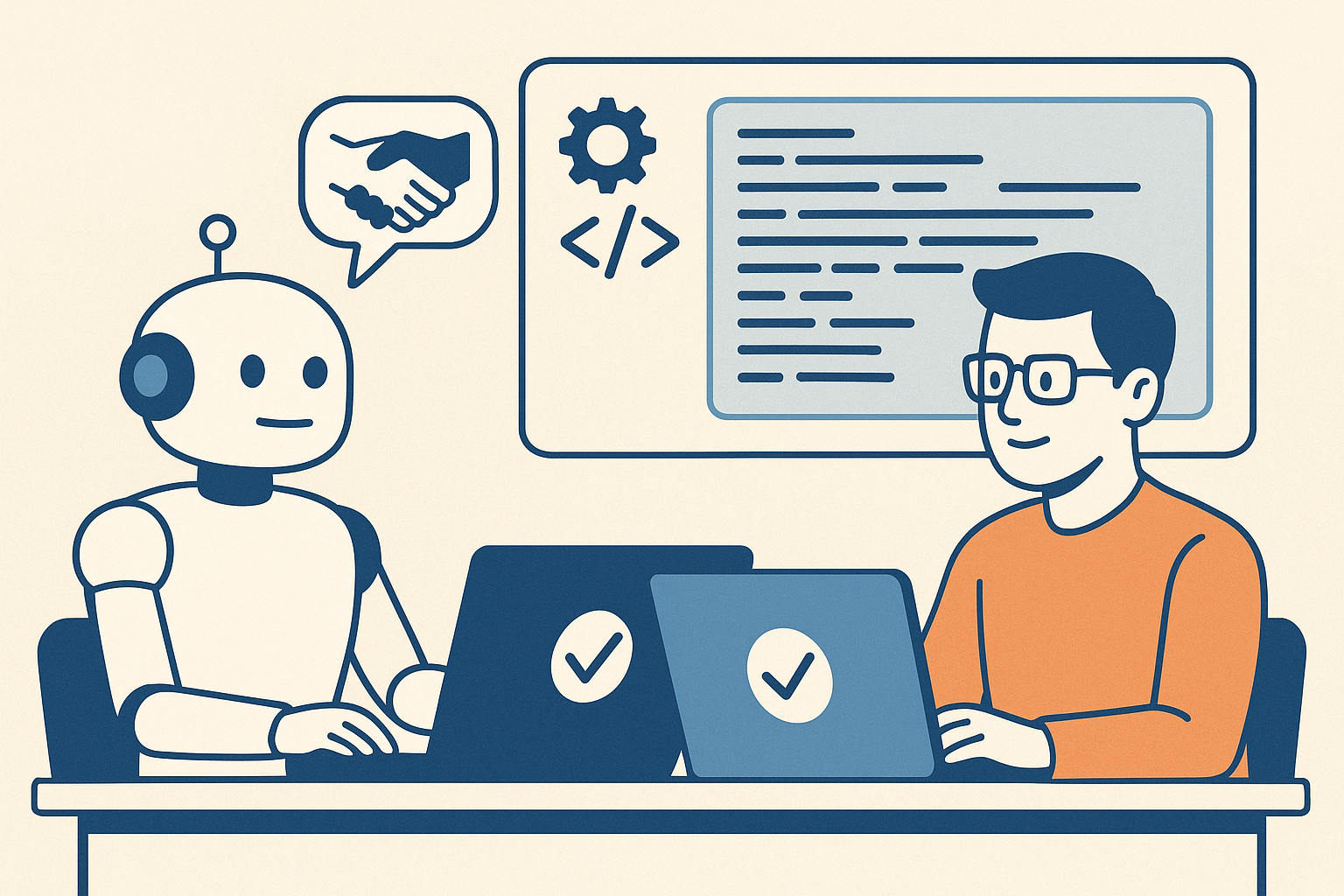
Let’s be clear about what’s changed and what hasn’t. The fundamental purpose of automated testing remains the same: gain confidence that code works as intended, catch regressions early, and document expected behavior. What’s changed is the economics and psychology of test creation.
AI coding assistants excel at several testing tasks:
Boilerplate Test Generation: Creating basic unit tests for simple methods, constructors, and data validation logic. These tests are often tedious to write manually, and AI can generate them consistently and quickly.
Test Data Creation: Generating realistic test data, edge cases, and boundary conditions. AI can often identify scenarios that developers might overlook.
Test Coverage Completion: Analyzing code and identifying untested paths or branches. AI can suggest tests that bring coverage percentages up systematically.
Repetitive Test Patterns: Creating similar tests for related functionality, like testing multiple API endpoints with similar structure.
For these scenarios, AI assistance is genuinely ruthlessly helpful. It’s practical (works with existing test frameworks), generally accepted (becoming standard practice), valuable (saves significant time), and archetypal (provides clear patterns).
But there are critical areas where AI-assisted testing introduces new risks:
Assumption Alignment: AI generates tests based on code structure, not business requirements. The tests might perfectly validate the code’s implementation while missing the fact that the implementation itself is wrong.
Test Quality Decay: When tests are easy to generate, teams stop thinking critically about test design. You end up with hundreds of tests that all validate the same happy path while missing critical failure modes.
False Confidence: High test coverage numbers from AI-generated tests can create illusion of safety. Teams see 90% coverage and assume quality, when those tests might be superficial.
Maintenance Burden: AI can create tests faster than you can maintain them. Teams accumulate thousands of tests without considering long-term maintenance cost.
This is where we need new strategies. The old testing approaches from my book still apply, but they need adaptation for AI-assisted development.
Here’s the framework I’m recommending to teams adopting AI coding assistants. It’s based on the principle that different types of tests serve different purposes, and AI is better at some than others.
Let AI generate basic unit tests, but with constraints:
What to Generate:
Quality Gates:
Implementation Example:
// AI excels at generating tests like this
[Theory]
[InlineData(0, 0)]
[InlineData(100, 100)]
[InlineData(-50, 50)]
public void Test_CalculateAbsoluteValue_ReturnsCorrectResult(int input, int expected)
{
    # Arrange + Act
    var result = MathUtilities.CalculateAbsoluteValue(input);

    # Assert
    Assert.Equal(expected, result);
}
The AI can generate these quickly and comprehensively. Your job is ensuring they test the right things.
This is where human judgment becomes critical. Integration tests verify that components work together correctly, and AI often struggles to understand these relationships.
What Humans Should Design: – Tests that verify business rules and workflows – Tests that validate interactions between components – Tests that ensure data flows correctly through the system – Tests that verify security and authorization boundaries
Why Humans, Not AI: AI generates tests based on code structure. Humans design tests based on business requirements and failure modes they’ve experienced. Integration tests require understanding of what the system should do, not just what it does do.
Implementation Approach: 1. Write integration test outlines describing the scenario and expected outcome 2. Use AI to help fill in test setup and data creation 3. Keep assertion logic explicit and human-reviewed 4. Document the business rule or requirement each test validates
This layer compensates for both human and AI blind spots.
Property-Based Testing: Instead of testing specific inputs, test properties that should always be true. AI can help generate the properties, but humans must define what properties matter. For more info, see: Property-based testing in C#
Example:
// Property: Serializing then deserializing should return equivalent object
[Test]
public void Test_SerializationRoundTrip_PreservesData()
{
    # Arrange
    var user = TestHelper.GenerateTestUser();
    var serialized = JsonSerializer.Serialize(user);

    # Act
    var deserialized = JsonSerializer.Deserialize<User>(serialized);

    # Assert
    Assert.Equal(user, deserialized);
}
Exploratory Testing: Use AI to generate random test scenarios and edge cases that humans might not consider. Tools like fuzzing can be enhanced with AI to generate more realistic test inputs.
The ultimate test of quality is production behavior. Modern testing strategies must include:
Synthetic Monitoring: Automated tests running against production systems to validate real-world behavior
Canary Deployments: Gradual rollout with automated rollback on quality metrics degradation
Feature Flags with Metrics: A/B testing new functionality with automated quality gates
Error Budget Tracking: Quantifying acceptable failure rates and automatically alerting when exceeded
This layer catches what all other layers miss. It’s particularly critical when AI is generating code, because AI might create perfectly valid code that behaves unexpectedly under production load or data.
Here’s how to adapt your testing practices for AI-assisted development, starting immediately.
Before generating more tests, understand what you have:
Coverage Analysis:
Test Quality Assessment:
Create clear guidelines for AI-assisted test creation:
When to Use AI:
When to Write Manually:
Quality Standards:
Don’t try to implement all layers at once. Start where you’ll get the most value:
Week 1-2: Implement Layer 1 (AI-generated unit tests)
Week 3-4: Strengthen Layer 2 (Human-designed integration tests)
Week 5-6: Add Layer 4 (Production monitoring)
Later: Add Layer 3 (Property-based testing)
Track both leading and lagging indicators of test effectiveness:
Leading Indicators:
Lagging Indicators:
The goal isn’t maximum test coverage; it’s maximum confidence in quality control at minimum cost.
This is actually a feature, not a bug. Consistent test structure makes tests easier to maintain. The problem is when all tests validate the same thing.
Solution: Focus review effort on test assertions. Do the tests validate different behaviors, or just different inputs to the same behavior? Use code review to catch redundant tests before they accumulate.
AI makes it easy to generate tests, which can lead to exponential growth in test count and execution time.
Solution: Implement test categorization and selective execution. Use tags to distinguish:
Don’t let AI generate slow tests. If a test needs database access or external services, it should be human-designed and tagged appropriately.
This is the fundamental risk of AI-assisted development. Tests validate what the code does, not what it should do.
Solution: Implement Layer 4 (production monitoring) as early as possible. No amount of testing replaces real-world validation. Use production metrics to identify gaps in test coverage and generate new test scenarios.
When tests are auto-generated, they feel less important than production code. Reviews become rubber stamps.
Solution: Make test quality a team value. Track metrics like:
Publicly recognize good test reviews and test design. Make it clear that test quality matters as much as code quality.
Organizations implementing modern testing strategies with AI assistance report numbers that should be taken with a grain of salt, because of source bias, different levels of maturity, and the fact that not all “test coverage” is equally valuable.
Calculate your team’s current testing economics:
Then try to quantify the impact of:
This Week:
This Month:
This Week:
This Month:
This Quarter:
This Year:
When I wrote about automated testing in 2011, the biggest challenge was convincing developers to write tests at all. The objections were always about time: “We don’t have time to write tests, we need to ship features.” I spent considerable effort building the business case for testing; showing how tests save time by catching bugs early.
Today’s challenge is almost the inverse. AI makes test creation so easy that teams can generate thousands of tests without thinking carefully about what they’re testing. The bottleneck has shifted from test creation to test design and maintenance.
This is actually a much better problem to have. Instead of debating whether to test, we’re debating how to test effectively. The ruthlessly helpful framework applies perfectly: automated testing is clearly valuable, widely accepted, and provides clear examples. The question is how to be practical about it.
My recommendation is to embrace AI for what it does well (generating routine, repetitive tests) while keeping humans focused on what we do well:
The teams that thrive won’t be those that generate the most tests or achieve the highest coverage percentages. They’ll be the teams that achieve the highest confidence with the most maintainable test suites. That requires strategic thinking about testing, not just tactical application of AI tools.
One prediction I’m comfortable making: in five years, we’ll look back at current test coverage metrics with the same skepticism we now have for lines-of-code metrics. The question won’t be “how many tests do you have?” but “how confident are you that your system works correctly?” AI-assisted testing can help us answer that question, but only if we’re thoughtful about implementation.
The future of testing isn’t AI vs. humans. It’s AI and humans working together, each doing what they do best, to build more reliable software faster.
In previous posts, I discussed the concept of “ruthlessly helpful” practices, which are those that are practical, valuable, widely accepted, and provide clear archetypes to follow. Today, I want to apply this framework to one of the most significant developments in software engineering that have happened since I wrote “Pro .NET Best Practices”: platform engineering.
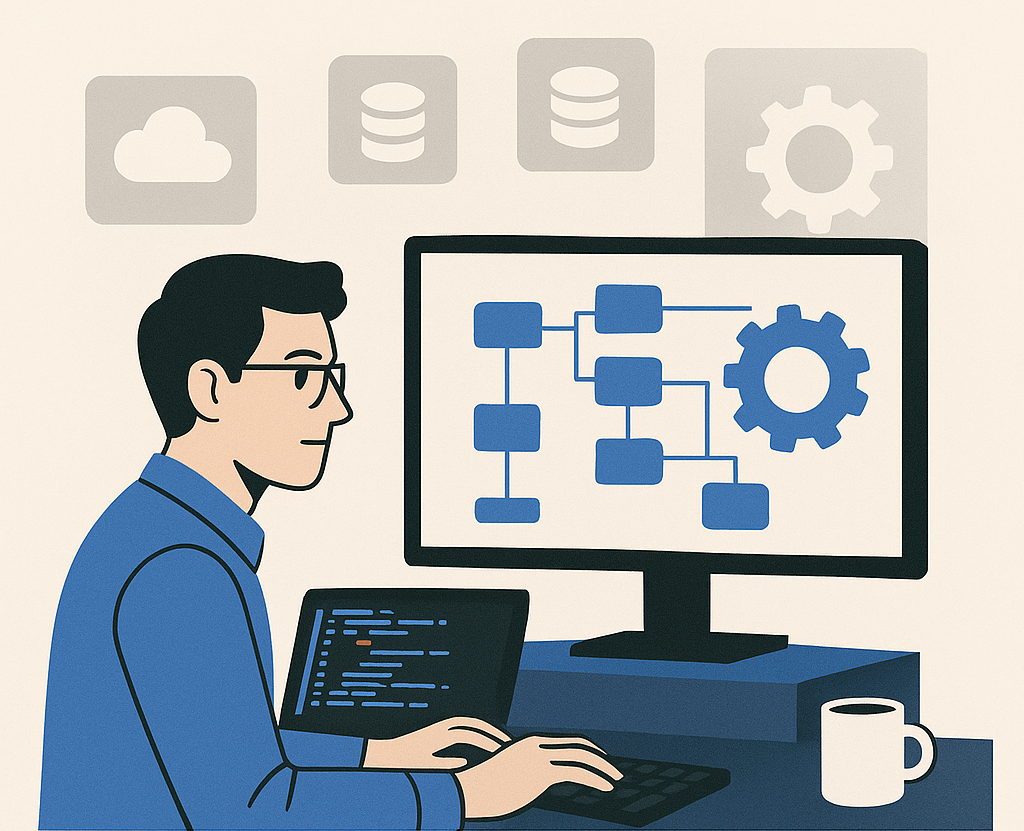
If you’re unfamiliar with the term, platform engineering is the practice of building and maintaining internal developer platforms that provide self-service capabilities and reduce cognitive load for development teams. Think of it as the evolution of DevOps, focused specifically on developer experience and productivity.
But before you dismiss this as another industry buzzword, let me walk through why platform engineering might be the most ruthlessly helpful practice your organization can adopt in 2025.
Modern software development requires an overwhelming array of tools, services, and configurations. Check out Curtis Collicutt’s The Numerous Pains of Programming.
A typical application today might need:
The list goes on. Each tool solves important problems, but the cognitive load of managing them all is crushing development teams. I regularly encounter developers who spend more time configuring tools than writing business logic.
This isn’t a tools problem. This is a systems problem. Individual developers shouldn’t need to become experts in Kubernetes networking or Terraform state management to deploy a web application. That’s where platform engineering comes in.
Platform engineering creates an abstraction layer between developers and the underlying infrastructure complexity. Instead of each team figuring out how to deploy applications, manage databases, or set up monitoring, the platform team provides standardized, self-service capabilities.
A well-designed internal developer platform (IDP) might offer:
The goal isn’t to eliminate flexibility—it’s to make the common cases easy and the complex cases possible.
Let’s apply our four criteria to see if platform engineering deserves your team’s attention and investment.
Platform engineering is most practicable for organizations with:
If you’re a small team with simple deployment needs, platform engineering might be overkill. But if you have multiple teams repeatedly solving the same infrastructure problems, it becomes highly practical.
Implementation Reality Check: Start small. You don’t need a comprehensive platform on day one. Begin with the most painful, repetitive task your teams face (often deployment or environment management) and build from there.
Platform engineering has moved well beyond the experimentation phase. Major organizations like Netflix, Spotify, Google, and Microsoft have demonstrated significant value from platform investments. The practice has enough adoption that:
More importantly, platform engineering builds on established practices. Particularly, practices aligned to the principles of automation, standardization, and reducing manual, error-prone processes.
Platform engineering addresses several measurable problems:
Developer Productivity: Teams report 20-40% improvements in deployment frequency and reduced time to productivity for new developers.
Cognitive Load Reduction: Developers can focus on business logic rather than infrastructure complexity.
Consistency and Reliability: Standardized platforms reduce environment-specific issues and improve overall system reliability.
Security and Compliance: Centralized platforms make it easier to implement and maintain security policies and compliance requirements.
Cost Optimization: Shared infrastructure and automated resource management typically reduce cloud costs.
The key is measuring these benefits in your specific context. Platform engineering is valuable when the cost of building and maintaining the platform is less than the productivity gains across all development teams.
Yes, with important caveats. The platform engineering community has produced excellent resources:
However, every organization’s platform needs are somewhat unique. The examples provide direction, but you’ll need to adapt them to your specific technology stack, team structure, and business requirements.
Platform engineering reminds me of continuous integration adoption patterns from the early 2000s. Teams that succeeded with CI followed a predictable pattern:
Platform engineering follows similar patterns. Here’s a practical approach:
Survey your development teams to identify their most time-consuming, repetitive infrastructure tasks. Common starting points:
Choose one area and build a simple, self-service solution. Success here creates momentum for broader platform adoption.
Once you have a working solution for one problem:
Use the success and lessons from Phase 1 to justify investment in additional platform capabilities. Prioritize based on team feedback and measurable impact.
Platform engineering doesn’t require hiring a specialized team immediately. Start with existing engineers who understand your infrastructure challenges. Many successful platforms begin as side projects that demonstrate value before becoming formal initiatives.
This is actually an argument for platform engineering, not against it. Provide standardized capabilities while allowing teams to use their preferred development tools on top of the platform.
Calculate the total cost of infrastructure complexity across all your teams. Include developer time spent on deployment issues, environment setup, and tool maintenance. Most organizations discover they’re already paying for platform engineering, but they’re just doing it inefficiently across multiple teams.
Measure platform engineering impact across three dimensions:
If platform engineering seems like a ruthlessly helpful practice for your organization:
Remember, the goal isn’t to build the most sophisticated platform. The goal is to build the platform that most effectively serves your teams and the business’ needs.
When I wrote about build automation in “Pro .NET Best Practices,” I focused on eliminating manual, error-prone processes that slowed teams down. Platform engineering is the natural evolution of that thinking, applied to the entire development workflow rather than just the build process.
What’s fascinating to me is how platform engineering validates many of the strategic principles from my book. The most successful platform teams think like product teams. Platform teams understand their customers (developers), measure satisfaction and adoption, and iterate based on feedback. They focus on removing friction and enabling teams to be more effective, rather than just implementing the latest technology.
The biggest lesson I’ve learned watching organizations adopt platform engineering is that culture matters as much as technology. Platforms succeed when they’re built with developers, not for developers. The most effective platform teams spend significant time understanding developer workflows, pain points, and preferences before building solutions.
This mirrors what I observed with continuous integration adoption: technical excellence without organizational buy-in leads to unused capabilities and wasted investment. The teams that succeed with platform engineering treat it as both a technical and organizational transformation.
Looking ahead, I believe platform engineering is (or will become) as fundamental to software development as version control or automated testing. The organizations that master it early will have a significant competitive advantage in attracting talent and delivering software efficiently. Those that ignore it will find themselves increasingly hampered by infrastructure complexity as the software landscape continues to evolve.
Is your organization considering platform engineering? What infrastructure challenges are slowing down your development teams? Share your experiences and questions in the comments below.
When I titled my book Pro .NET Best Practices back in 2011, I wrestled with that word “best.” It’s a superlative that suggests there’s nothing better, no room for discussion, and no consideration of context. Over the years, I’ve watched teams struggle not because they lacked good practices, but because they blindly adopted “best practices” that weren’t right for their situation.
Today, as development teams face an overwhelming array of tools, frameworks, and methodologies, this challenge has only intensified. The industry produces new “best practices” faster than teams can evaluate them, let alone implement them effectively. It’s time we moved beyond the cult of “best” and embraced something more practical: being ruthlessly helpful.
The software development industry loves superlatives. We have “best practices,” “cutting-edge frameworks,” and “industry-leading tools.” But here’s what I’ve learned from working with hundreds of development teams: the practice that transforms one team might completely derail another.
Consider continuous deployment—often touted as a “best practice” for modern development teams. For a team with mature automated testing, strong monitoring, and a culture of shared responsibility, continuous deployment can be transformative. But for a team still struggling with manual testing processes and unclear deployment procedures, jumping straight to continuous deployment is like trying to run before learning to walk.
The problem isn’t with the practice itself. The problem is treating any practice as universally “best” without considering context, readiness, and specific team needs.
Instead of asking “What are the best practices?” we should ask “What practices would be ruthlessly helpful for our team right now?” This shift in thinking changes everything about how we evaluate and adopt new approaches.
A ruthlessly helpful practice must meet four criteria:
The practice must be something your team can actually implement given your current constraints, skills, and organizational context. This isn’t about lowering standards—it’s about being honest about what’s achievable.
A startup with three developers has different constraints than an enterprise team with fifty. A team transitioning from waterfall to agile has different needs than one that’s been practicing DevOps for years. The most elegant practice in the world is useless if your team can’t realistically adopt it.
While innovation has its place, most teams benefit from practices that have been proven in real-world environments. Generally accepted practices come with community support, documentation, tools, and examples of both success and failure.
This doesn’t mean chasing every trend. It means choosing practices that have demonstrated value across multiple organizations and contexts, with enough adoption that you can find resources, training, and peer support.
A ruthlessly helpful practice must address actual problems your team faces, not theoretical issues or problems you think you might have someday. The value should be measurable and connected to outcomes that matter to your stakeholders.
If your team’s biggest challenge is deployment reliability, adopting a new code review tool might be a good practice, but it’s not ruthlessly helpful right now. Focus on practices that move the needle on your most pressing challenges.
The practice should come with concrete examples and implementation patterns that your team can follow. Abstract principles are useful for understanding, but teams need specific guidance to implement practices successfully.
Look for practices that include not just the “what” and “why,” but the “how”—with code examples, tool configurations, and step-by-step implementation guidance.
Let’s apply this framework to a practice many teams are considering today: AI-assisted development with tools like GitHub Copilot.
Is it Practicable? For most development teams in 2025, yes. The tools are accessible, integrate with existing workflows, and don’t require massive infrastructure changes. However, teams need basic proficiency with their existing development tools and some familiarity with code review practices.
Is it Generally Accepted? Increasingly, yes. Major organizations are adopting AI assistance, there’s growing community knowledge, and the tools are becoming standard in many development environments. We’re past the experimental phase for basic AI assistance.
Is it Valuable? This depends entirely on your context. If your team spends significant time on boilerplate code, routine testing, or documentation, AI assistance can provide measurable value. If your primary challenges are architectural decisions or complex domain logic, the value may be limited.
Is it Archetypal? Yes, with caveats. There are clear patterns for effective AI tool usage, but teams need to develop their own guidelines for code review, quality assurance, and skill development in an AI-assisted environment.
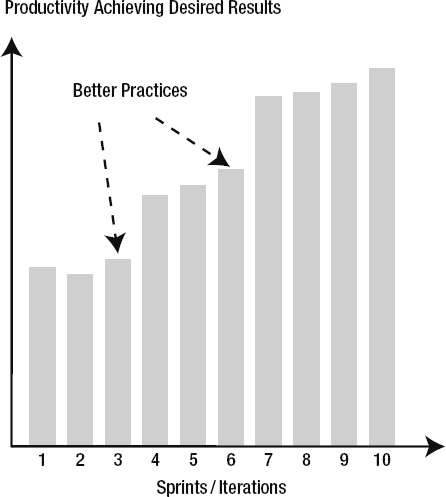
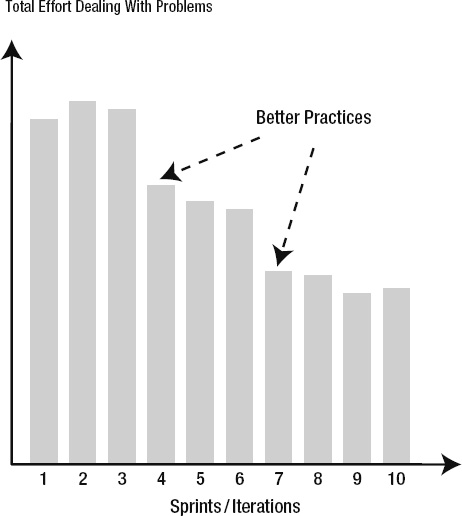
For many teams today, AI-assisted development meets the criteria for a ruthlessly helpful practice. But notice how the evaluation depends on team context, current challenges, and implementation readiness.
Even when a practice meets all four criteria, teams often struggle with adoption. Here are the most common obstacles I’ve observed:
Teams often try to implement practices perfectly from day one. This leads to overwhelm and abandonment when reality doesn’t match expectations.
Solution: Embrace incremental adoption. Start with the simplest, highest-value aspects of a practice and build competency over time. Perfect implementation is the enemy of practical progress.
Many teams choose tools before understanding the practice, leading to solutions that don’t fit their actual needs.
Solution: Understand the practice principles first, then evaluate tools against your specific requirements. The best tool is the one that fits your team’s context and constraints.
Technical practices often require cultural changes that teams underestimate or ignore entirely.
Solution: Address cultural and process changes explicitly. Plan for training, communication, and gradual behavior change alongside technical implementation.
One of the most important aspects of adopting new practices is measuring their impact. Here’s how to approach measurement for ruthlessly helpful practices:
Take inventory of your current development practices using the ruthlessly helpful framework:
Remember, the goal isn’t to adopt the most practices or the most advanced practices. The goal is to adopt practices that make your team more effective at delivering value.
Fourteen years after writing Pro .NET Best Practices, I’m more convinced than ever that context matters more than consensus when it comes to development practices. The “best practice” approach encourages cargo cult programming—teams adopting practices because they worked somewhere else, without understanding why or whether they fit the current situation.
The ruthlessly helpful framework isn’t just about practice selection—it’s about developing judgment. Teams that learn to evaluate practices systematically become better at adapting to change, making strategic decisions, and avoiding the latest hype cycles.
What’s changed since 2011 is the velocity of change in our industry. New frameworks, tools, and practices emerge constantly. The teams that thrive aren’t necessarily those with the best individual practices—they’re the teams that can quickly and accurately evaluate what’s worth adopting and what’s worth ignoring.
The irony is that by being more selective and contextual about practice adoption, teams often end up with better practices overall. They invest their limited time and energy in changes that actually move the needle, rather than spreading themselves thin across the latest trends.
The most successful teams I work with today have learned to be ruthlessly helpful to themselves—choosing practices that fit their context, solve their problems, and provide clear paths to implementation. It’s a more humble approach than chasing “best practices,” but it’s also more effective.
What practices is your team considering? How do they measure against the ruthlessly helpful criteria? Share your thoughts and experiences in the comments below.
Fadi Stephan and I presented our Back to the Future – A look back at Agile Engineering Practices and their Future with AI talk at AgileDC 2025. I think Back to the Future with AI is bit simpler.
In this blog post I explain what this talk is all about. The theme is to understand how AI is transforming the Agile engineering practices established decades ago.
The talk began by revisiting the origins of Agile in 2001 at Snowbird, Utah, when methodologies like XP, Scrum, and Crystal led to the Agile Manifesto and its 12 principles. We focused on Principle #9 “Continuous attention to technical excellence and good design enhances agility” and asked whether that principle still holds true in 2025.
Note: AI isn’t just changing how code is written … it’s challenging the very reasons Agile engineering practices were created. Yet our goal is not to replace Agile, but to evolve it for the AI era.
We reviewed six practices that we teach and coach teams on as we reflect on the adoption.
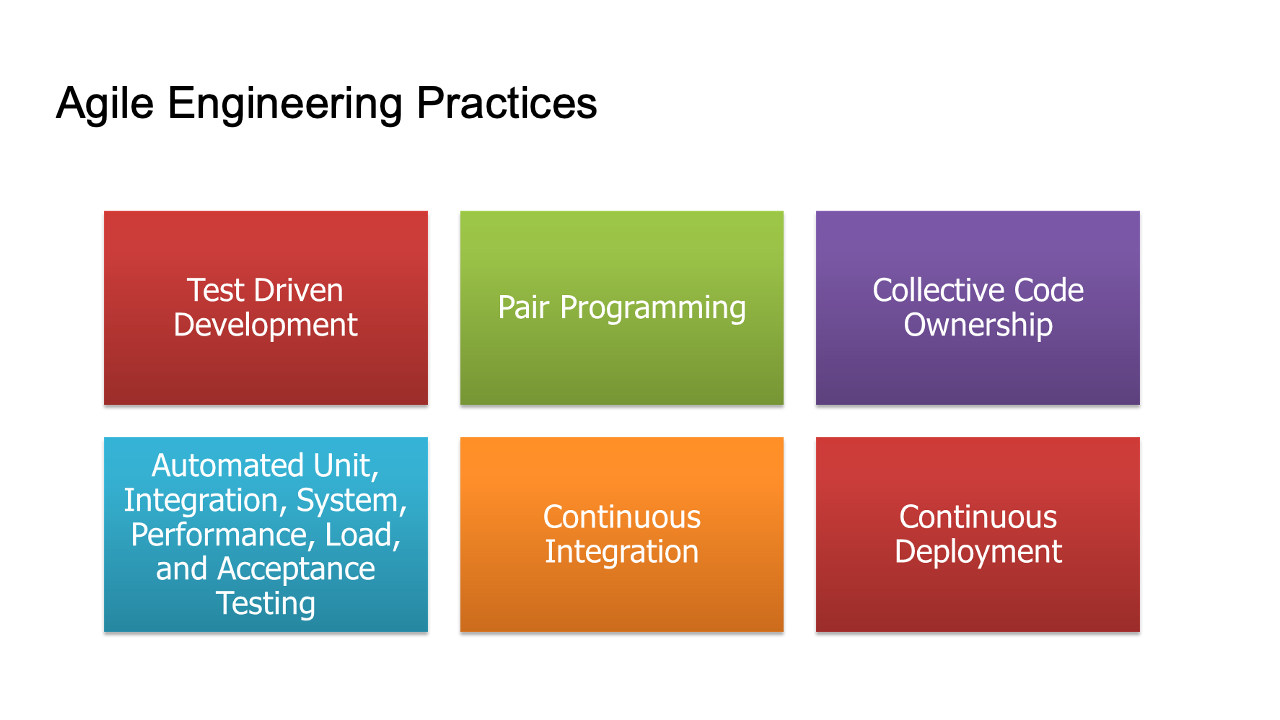
Note: that while CI/CD and test automation have spread widely, it is true TDD, Pair Programming, and Collective Code Ownership that remain rare. Yet these are the very practices that make the others sustainable.
Part 1: Fadi and I performed human-with-human TDD and pair programming using a simple spreadsheet project.
Part 2: I continued the process with AI assistance (GitHub Copilot), showing how AI can take over much of the “red-green-refactor” loop through comment-based prompting.
Next, we looked toward the future and made some informed guesses about where things might go.
| Classic Agile Practice | Evolved AI Practice |
|---|---|
| Test-Driven Development | Prompt-Driven Development |
| Pair Programming | AI Pairing |
| Collective Code Ownership | AI Code Ownership |
| Automated Testing | Acceptance Spec–Driven Development |
| Continuous Integration | AI-Generated Test Suites |
| Continuous Deployment | Infrastructure as Spec |
As AI takes over mechanical and repetitive aspects, the human role shifts to:
We concluded the talk by emphasizing that Agile’s core values of collaboration, learning, and delivering customer value will remain essential. However, the means of achieving technical excellence are evolving rapidly. Rather than resisting change, developers should co-evolve with AI, embracing new forms of collaboration, feedback, and craftsmanship.
The Agile practices of 2001 are not obsolete; but in the age of AI, they are being reborn.
In Mark Winteringham’s latest book, “AI-Assisted Testing,” he offers a balanced guide to the future of software testing. Manning early access version: https://www.manning.com/books/ai-assisted-testing

The field of software testing is rapidly evolving, and the author conducts a thoughtful and practical exploration of how artificial intelligence (AI), particularly generative AI, can improve the testing landscape.
Mark Winteringham’s journey into software testing is somewhat unconventional. Initially, he aspired to be a musician. He made his way into software testing through an interest in computers and his job testing music software. His background gave him a unique approach to testing, with a creative problem-solving aspect. The author’s 15+ years of experience and his previous book, “Testing Web APIs,” establishes him as a good thought leader in testing. I enjoyed learning more about Mark Winteringham during this HockeyStick Show interview.
What I like about “AI-Assisted Testing” is that it’s a structured guide through the many ways AI can enhance software testing. The book is divided into three main parts:
This section introduces the concept of large language models (LLMs) and how they can be leveraged to enhance testing activities. Winteringham emphasizes the importance of understanding the potential and, what’s more important, the limitations of these models. He advocates for a balanced approach that integrates human expertise with AI capabilities.
Instead of attempting to use LLMs to replicate the full gamut of testing activities that exist within a lifecycle, we prioritize the best of our abilities as humans and the value we bring to testing. Then we choose to add LLMs in select areas to expand our work so that we can move faster, learn more and help ensure our teams are better informed so that they can build higher-quality products.
Here, Winteringham dives into practical applications of LLMs in various testing scenarios. From test planning and data generation to UI automation and exploratory testing, the book provides concrete examples and use cases that demonstrate the tangible benefits of AI-assisted testing.
The final section explores advanced topics such as fine-tuning LLMs with domain-specific knowledge and using retrieval-augmented generation (RAG) to improve testing outcomes. This part is particularly useful for testers looking to tailor AI tools to their specific needs.
One of the things I like about “AI-Assisted Testing” is its practical focus. Winteringham does not merely theorize about the potential of AI; he provides detailed inputs and examples of how to implement AI tools in real-world testing scenarios. For instance, he explains how to use AI to generate boilerplate code for test automation, thus saving valuable time and allowing testers to focus on more complex tasks.
He also highlights the importance of prompt engineering – the art of crafting effective inputs for AI models to maximize their output. He provides readers with a library of prompts and practical tips for creating their own, ensuring that testers can harness the full power of AI without falling into common pitfalls.
Throughout the book, Winteringham maintains a healthy skepticism about the capabilities of AI, cautioning readers against over-reliance on these tools. He emphasizes that AI should be seen as a “collaborator” rather than a replacement for human testers. This perspective is really important in our industry, which often swept up in the hype of new technologies.
In his interview, Winteringham elaborates on this point, noting that while AI can significantly enhance certain aspects of testing, it cannot replicate the critical- and lateral-thinking skills of a human tester. He argues that the real value of AI lies in its ability to handle repetitive, algorithmic tasks, freeing up testers to engage in more creative and analytical work.
Winteringham’s emphasis on the human element in testing is a recurring theme in both the book and his interview. He advocates for a collaborative approach where testers use AI tools to augment their skills and improve their efficiency. This perspective is refreshing in an era where the fear of job displacement by AI is prevalent.
By highlighting the need for empathy, collaboration, and critical thinking in testing, Winteringham ensures that “AI-Assisted Testing” is not just about technology but also about the people who use it. His approach encourages testers to view AI as an ally that can help them achieve better results, rather than a threat to their livelihood.
I think that “AI-Assisted Testing” is a must-read for anyone involved in software testing. It offers a comprehensive and balanced view of how AI can be integrated into testing processes. It provides practical insights and examples. It makes theoretical concepts accessible and actionable.
Dynamic analysis is a powerful technique in software development, aimed at gathering comprehensive information about a program’s behavior during execution. Unlike static analysis, which examines code without running it, dynamic analysis involves running the program under various conditions to collect data on performance, memory usage, code coverage, and internal states. This process provides invaluable insights into how the software interacts with its environment, making it an essential tool for developers striving to optimize and secure their applications.

Dynamic analysis encompasses several methods and tools designed to monitor and evaluate a program’s runtime behavior. By executing the software and observing its interactions, developers can answer critical questions such as:
These questions highlight the core areas where dynamic analysis can be applied to improve software quality and performance.
One of the primary goals of dynamic analysis is to assess code coverage, which measures how thoroughly the code is exercised by tests. Code coverage tools track the execution of code during test runs and provide metrics on various aspects:
These metrics help developers identify untested parts of the code, ensuring comprehensive test coverage and improving the software’s reliability.
Kellerman Software NUnit Test Generator is a tool designed to streamline the creation of unit tests in VB.NET or C# by generating test stubs and extracting documentation from existing code. Here are its key features:
Microsoft IntelliTest is a sophisticated tool that automates the generation of unit tests for .NET code by leveraging code analysis and constraint-solving techniques. It allows developers to quickly create comprehensive test suites, identify potential bugs early, and reduce test maintenance costs. IntelliTest has the following features:
Jay Berkenbilt, the original author of QPDF, made significant contributions to the field of automated test coverage. In his 2004 paper titled Automated Test Coverage: Taking Your Test Suites To the Next Level, Berkenbilt outlined a lightweight, language-agnostic approach to integrating test coverage into automated test suites [slides]. This method involves embedding coverage calls within the code, maintaining a coverage case registry, and using a coverage analyzer to verify that all test scenarios are exercised. This approach addresses potential weaknesses in traditional test suites by coupling tests with code conditions, thus preventing unintentional omissions and ensuring continuous code coverage even as the software evolves.
Building on these principles, Berkenbilt released QTest in October 2007, an automated test framework designed to test command-line tools [QTest manual]. QTest is implemented in Perl, making it compatible with various UNIX-like systems and Windows environments through Cygwin or ActiveState Perl. Key features of QTest include:
QTest’s emphasis on comprehensive test coverage and flexibility makes it a robust tool for ensuring software reliability and correctness.
Performance profiling is another crucial aspect of dynamic analysis, focusing on the program’s runtime performance characteristics. Performance profiling can be divided into two main techniques:
Using performance profiling tools, developers can diagnose and resolve performance bottlenecks, ensuring the application meets performance expectations under various scenarios.
Memory profiling helps developers understand and optimize an application’s memory usage. By regularly monitoring memory consumption, potential issues can be identified and addressed before they lead to significant problems. Memory profiling is especially useful for detecting memory leaks and optimizing resource utilization, contributing to the overall stability and efficiency of the software.
Database performance often plays a critical role in application efficiency. Query profiling tools help developers identify and resolve database-related performance issues by revealing:
By analyzing query performance, developers can implement improvements such as caching or indexing, enhancing the application’s responsiveness and scalability.
Effective logging is an essential part of dynamic analysis, providing a detailed record of the program’s execution. A robust logging solution should:
Logging not only aids in troubleshooting and debugging but also supports ongoing monitoring and maintenance. It helps capture critical information about the system’s state and behavior, making it easier to diagnose and resolve issues.
Dynamic analysis should be an integral part of the software development lifecycle (SDLC), encompassing:
Dynamic analysis offers developers a wealth of information about their software’s behavior during execution. By leveraging tools for code coverage, performance profiling, memory profiling, query profiling, and logging, developers can enhance the quality, performance, and security of their applications. Integrating dynamic analysis into the SDLC ensures that issues are detected and resolved early, leading to more robust and reliable software.
I was interviewed me for the Lunch with Tech Leaders podcast on the topic of Crucial Skills That Make Engineers Successful. Check it out! 🎙
The other day I was speaking with an engineer and they asked me to describe the crucial skills that make engineers successful. I think this is an important topic.
In a world driven by technological innovation, the role of an engineer is more crucial than ever. Yet, what separates good engineers from successful ones isn’t just technical know-how; it involves a mastery of various practical and soft skills. Let’s explore these skills.
Problem Solving — Every engineer’s primary role involves solving problems to build things or fix things. However, successful engineers distinguish themselves by tackling novel challenges that aren’t typically addressed in conventional education. Refine your ability to devise innovative solutions.
Learn and practice techniques such as:
Creativity — John Cleese once said, “Creativity is not a talent … it is a way of operating.” Creativity in engineering isn’t about artistic ability; it’s about thinking differently and being open to new ideas.
Foster creativity by:
Critical Thinking — This involves a methodical analysis and evaluation of information to form a judgment. This skill is vital for making informed decisions and avoiding costly mistakes in complex projects.
Successful engineers often excel at:
Domain Expertise – Understanding the specific needs and processes of the business, market, or industry you are working with can greatly enhance the relevance and impact of your engineering solutions. Domain expertise allows engineers to deliver more targeted and effective solutions.
Learn the domain by:
The importance of emotional intelligence (EQ) in engineering cannot be overstated. As engineers advance in their careers, their technical responsibilities often broaden to include leadership roles. These skills help in nurturing a positive work environment and team effectiveness. Moreover, as many experts suggest, EQ tends to increase with age, which provides a valuable opportunity for personal development over time.
Broaden your skills to include more soft skills:
Personal Process — Engineering is as much about personal growth as it is about technical know-how. Successful engineers maintain a disciplined personal development process that helps them continuously improve their performance.
Hone your ability and habit of:
Team Process — In collaborative environments, the ability to facilitate, influence, and negotiate becomes crucial. Successful engineers need to articulate and share their vision, adapt their roles to the team’s needs, and contribute to building efficient, inclusive teams. This involves balancing speed and quality in engineering tasks and fostering an environment where new and better practices are embraced.
The landscape of engineering is constantly evolving, driven by advancements in technology and changes in market demands. Remaining successful as an engineer requires a commitment to lifelong learning—actively seeking out new knowledge and skills to stay ahead of the curve.
In summary, to adapt and thrive, you must take charge of you own skill development.
If you are looking to deepen your understanding of these concepts, many resources are available. Here are some recommended resources to provide insights and tools to enhance you skills.
For every method-under-test there is a set of valid preconditions and arguments. It is the domain of all possible values that allows the method to work properly. That domain defines the method’s boundaries. Boundary testing requires analysis to determine the valid preconditions and the valid arguments. Once these are established, you can develop tests to verify that the method guards against invalid preconditions and arguments.
Boundary-value analysis is about finding the limits of acceptable values, which includes looking at the following:
An example of a situational case for dates is a deadline or time window. You could imagine that for a student loan origination system, a loan disbursement must occur no earlier than 30 days before or no later than 60 days after the first day of the semester.
Another situational case might be a restriction on age, dollar amount, or interest rate. There are also rounding-behavior limits, like two-digits for dollar amounts and six-digits for interest rates. There are also physical limits to things like weight and height and age. Both zero and one behave uniquely in certain mathematical expressions. Time zone, language and culture, and other test conditions could be relevant. Analyzing all these limits helps to identify boundaries used in test code.
Note: Dealing with date arithmetic can be tricky. Boundary analysis and good test code makes sure that the date and time logic is correct.
When the test code calls a method-under-test with an invalid argument, the method should throw an argument exception. This is the intended behavior, but to verify it requires a negative test. A negative test is test code that passes if the method-under-test responds negatively; in this case, throwing an argument exception.
The test code shown here fails the test because ComputePayment is provided an invalid termInMonths of zero. This is test code that’s not expecting an exception.
[TestCase(7499, 1.79, 0, 72.16)]
public void ComputePayment_WithProvidedLoanData_ExpectProperMonthlyPayment(
  decimal principal,
  decimal annualPercentageRate,
  int termInMonths,
  decimal expectedPaymentPerPeriod)
{
  // Arrange
  var loan =
    new Loan
    {
      Principal = principal,
      AnnualPercentageRate = annualPercentageRate,
    };

  // Act
  var actual = loan.ComputePayment(termInMonths);

  // Assert
  Assert.AreEqual(expectedPaymentPerPeriod, actual);
}
The result of the failing test is shown, it’s output from Unexpected Exception.
LoanTests.ComputePayment_WithProvidedLoanData_ExpectInvalidArgumentException : Failed
System.ArgumentOutOfRangeException : Specified argument was out of the range of valid
values.

Parameter name: termInPeriods
at
Tests.Unit.Lender.Slos.Model.LoanTests.ComputePayment_WithProvidedLoanData_ExpectInvalidArgu
mentException(Decimal principal, Decimal annualPercentageRate, Int32 termInMonths, Decimal
expectedPaymentPerPeriod) in LoanTests.cs: line 25
The challenge is to pass the test when the exception is thrown. Also, the test code should verify that the exception type is InvalidArgumentException. This requires the method to somehow catch the exception, evaluate it, and determine if the exception is expected.
In NUnit this can be accomplished using either an attribute or a test delegate. In the case of a test delegate, the test method can use a lambda expression to define the action step to perform. The lambda is assigned to a TestDelegate variable within the Act section. In the Assert section, an assertion statement verifies that the proper exception is thrown when the test delegate is invoked.
The invalid values for the termInMonths argument are found by inspecting the ComputePayment method’s code, reviewing the requirements, and performing boundary analysis. The following invalid values are discovered:
Below the new test is written to verify that the ComputePayment method throws an ArgumentOutOfRangeException whenever an invalid term is passed as an argument to the method. These are negative tests, with expected exceptions.
[TestCase(7499, 1.79, 0, 72.16)]
[TestCase(7499, 1.79, -1, 72.16)]
[TestCase(7499, 1.79, -2, 72.16)]
[TestCase(7499, 1.79, int.MinValue, 72.16)]
[TestCase(7499, 1.79, 361, 72.16)]
[TestCase(7499, 1.79, int.MaxValue, 72.16)]
public void ComputePayment_WithInvalidTermInMonths_ExpectArgumentOutOfRangeException(
  decimal principal,
  decimal annualPercentageRate,
  int termInMonths,
  decimal expectedPaymentPerPeriod)
{
  // Arrange
  var loan =
    new Loan
    {
      Principal = principal,
      AnnualPercentageRate = annualPercentageRate,
    };

  // Act
  TestDelegate act = () => loan.ComputePayment(termInMonths);

  // Assert
  Assert.Throws<ArgumentOutOfRangeException>(act);
}
Every object is in some arranged state at the time a method of that object is invoked. The state may be valid or it may be invalid. Whether explicit or implicit, all methods have expected preconditions. Since the method’s preconditions are not spelled out, one goal of good test code is to test those assumptions as a way of revealing the implicit expectations and turning them into explicit preconditions.
For example, before calculating a payment amount, let’s say the principal must be at least $1,000 and less than $185,000. Without knowing the code, these limits are hidden preconditions of the ComputePayment method. Test code can make them explicit by arranging the classUnderTest with unacceptable values and calling the ComputePayment method. The test code asserts that an expected exception is thrown when the method’s preconditions are violated. If the exception is not thrown, the test fails.
This code sample is testing invalid preconditions.
[TestCase(0, 1.79, 360, 72.16)]
[TestCase(997, 1.79, 360, 72.16)]
[TestCase(999.99, 1.79, 360, 72.16)]
[TestCase(185000, 1.79, 360, 72.16)]
[TestCase(185021, 1.79, 360, 72.16)]
public void ComputePayment_WithInvalidPrincipal_ExpectInvalidOperationException(
  decimal principal,
  decimal annualPercentageRate,
  int termInMonths,
  decimal expectedPaymentPerPeriod)
{
  // Arrange
  var classUnderTest =
  new Application(null, null, null)
  {
    Principal = principal,
    AnnualPercentageRate = annualPercentageRate,
  };

  // Act
  TestDelegate act = () => classUnderTest.ComputePayment(termInMonths);

  // Assert
  Assert.Throws<InvalidOperationException>(act);
}
Implicit preconditions should be tested and defined by a combination of exploratory testing and inspection of the code-under-test, whenever possible. Test the boundaries by arranging the class-under-test in improbable scenarios, such as negative principal amounts or interest rates.
Tip: Testing preconditions and invalid arguments prompts a lot of questions. What is the principal limit? Is it $18,500 or $185,000? Does it change from year to year?
More on boundary-value analysis can be found at Wikipedia https://en.wikipedia.org/wiki/Boundary-value_analysis
Pro .NET Best Practices
 Ruthlessly Helpful